Specifying User Privileges
OpenSearch Dashboards does not provide role level access to the dashboards and visualizations, so PeopleSoft provides the required security by mapping the dashboards to PeopleSoft roles.
Note:
The Search Administrator role is considered as the super user in OpenSearch Dashboards. Thus, a user with the Search Administrator role has access to all the dashboards and visualizations. However, the Search Administrator role does not have access to the data in OpenSearch Dashboards. Access to the data is controlled by the application-specific roles. If a user does not have access to the data, the visualization displays the message: No results found.
Use the Insights Privileges page to specify user privileges for the dashboards and to create visualizations.
Access the Insights Privileges page by selecting .
This example illustrates the fields and controls on the Insights Privileges page. You can find definitions for the fields and controls later on this page.
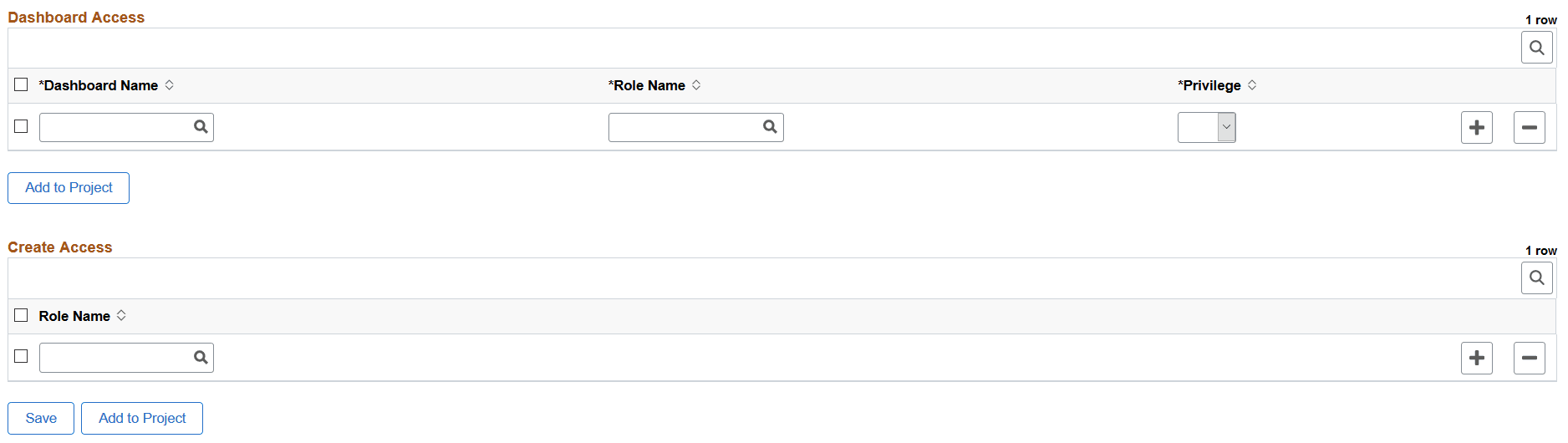
Dashboard Access Grid
| Field or Control | Description |
|---|---|
|
Dashboard Name |
The drop-down list displays the imported dashboards. Choose a dashboard. |
|
Role Name |
Choose an application specific role that you want to map to the selected dashboard. The application-specific role enables a user to access and view data in OpenSearch Dashboards. |
|
Privilege |
Valid values are:
With this security layer, only users with the specified role can view or edit a dashboard. Furthermore, if you want to personalize a tile (dashboard) on your home page, the tile will be listed only if you have the privilege, that is, you have the role specified on the Insights Privileges page. Therefore, administrators must take into account the users to whom the dashboards should be available. |
Create Access Grid
| Field or Control | Description |
|---|---|
|
Role Name |
For a user to create a new dashboard, the user should have at least one of the access roles mapped in the create access list. A user who is the creator of the dashboard possesses the edit privilege irrespective of the role mapped in the dashboard create access grid. A user with the Search Administrator role can access all the dashboards. |
|
Add to Project |
Enables you to add data set instances on the page to an existing or new ADS project. See Lifecycle Management Guide: Adding Data Set Instances from Object Designer Pages. |
A dashboard can be mapped to multiple roles with different privileges for a user.