Turning Off Real-Time Indexing During Batch Processing
While processing high volume batch updates for search definitions, real-time indexing can cause a sudden increase in the number of entries to process in the real-time indexing staging table. This can, in turn, cause the database table fragmentation to increase and eventually slow down the performance. Therefore, for large volume batch updates, it is recommended that real-time indexing be temporarily suspended and changes to the search index be updated through incremental indexing.
Note:
When real-time indexing is off, the staging table will not receive any data for both online and batch programs.
After the batch programs are completed, incremental indexing for a search definition will take place at the scheduled time. When incremental indexing starts, real-time indexing is automatically enabled for the search definition.
Enabling Batch on Real Time Indexing
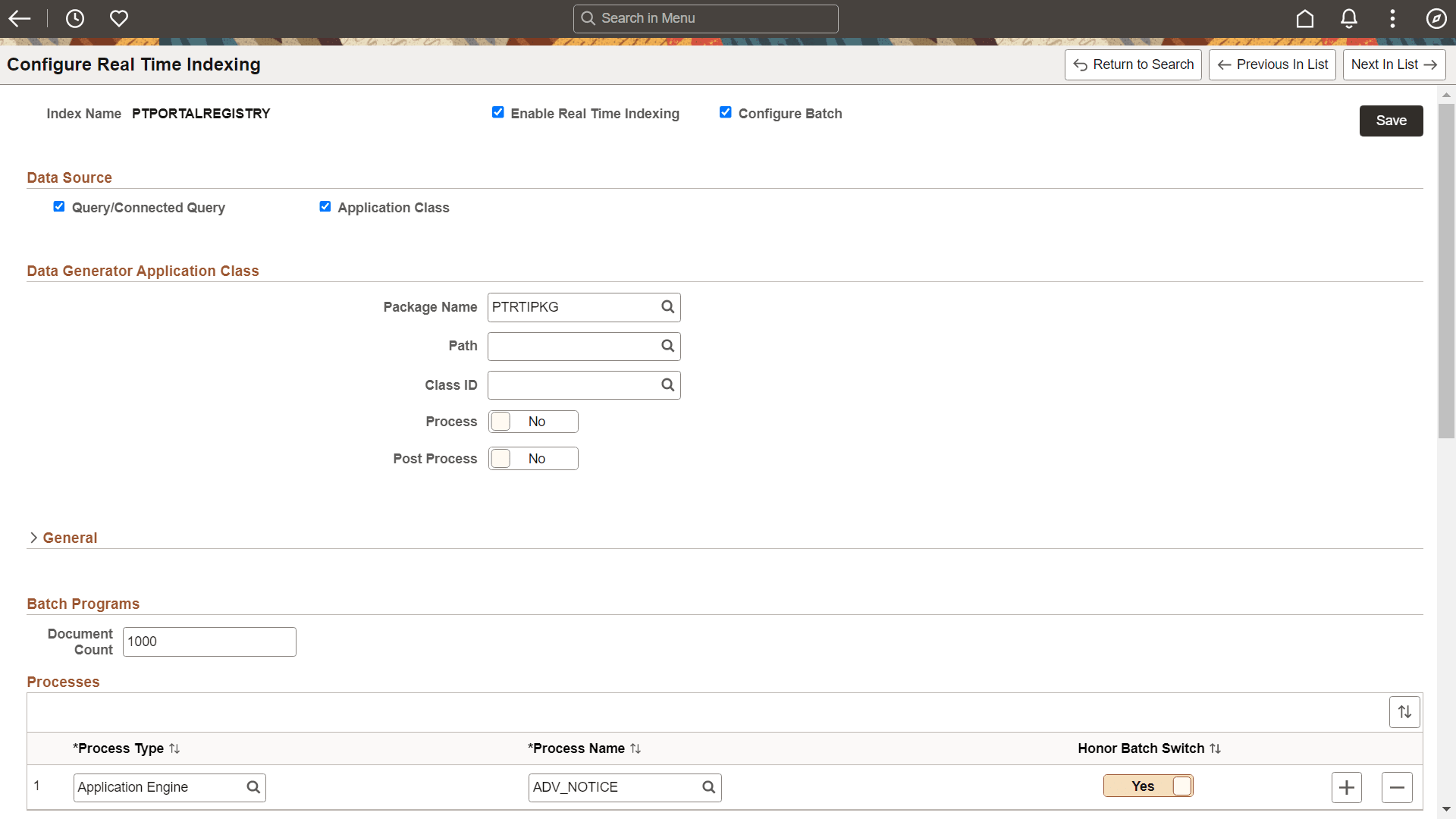
Use the Configure Batch option on the Configure Real Time Indexing page to enable a batch program.
When you select the Configure Batch option for a search definition, you can access a list of batch programs, delivered by Applications for the search definition, that can cause high volume updates to the trigger records. You can choose additional batch programs from the drop-down, but these must be coded to use the batch switch. Oracle does not recommend adding batches other than the ones delivered for the search definition.
Select batch programs by process type and process name to turn off real-time indexing for them.
Oracle delivers functions that application developers can use to programmatically turn off real-time indexing and set the document count value. However, these functions can only be used with Application Engine programs. See PeopleCode Language Reference: TurnOffRTI function.
Programs using SQL or COBOL need to perform a direct SQL execution to turn off real-time indexing.
Following is an example to turn off real-time indexing in COBOL and SQR:
MERGE INTO PS_PTSF_RTI_STATUS d
USING(SELECT :1 PTSF_INDEX_NAME from dual)
ON(d.PTSF_INDEX_NAME = s.PTSF_INDEX_NAME)
WHEN MATCHED THEN UPDATE SET d.PTRTISTATUS = 0
WHEN NOT MATCHED THEN INSERT VALUES(:1, 0)));
This example illustrates the fields and controls on the Configure Real Time Indexing page with the Configure Batch option selected:
| Field or Control | Description |
|---|---|
|
Document Count |
The document count is a threshold beyond which the real-time indexing process should be disabled during batch runs. Large batch jobs with records beyond this count should have real-time indexing disabled. The default is set to 0. 0 means real-time indexing is not turned off. Note: This count will be used by application developers as a deciding factor to invoke the TurnOffRTI function. Applications will look for a number greater than 0 to compare to the record count for batch jobs to determine whether or not to disable real-time indexing. |
|
Process Type |
Select the process type. |
|
Process Name |
Select the process name. |
|
Honor Batch Switch |
Set the Honor Batch Switch option to Yes if you want the Real Time Indexing Switch to honor the process (batch program). When the Honor Batch Switch option is set to No, the request to turn off real-time indexing for the batch program will be ignored. Note: Applications will deliver the configuration with the Honor Batch Switch turned off. You must turn it to Yes if you have large batch runs and you must also set the Document Count. |
Using the Real Time Indexing Switch Page
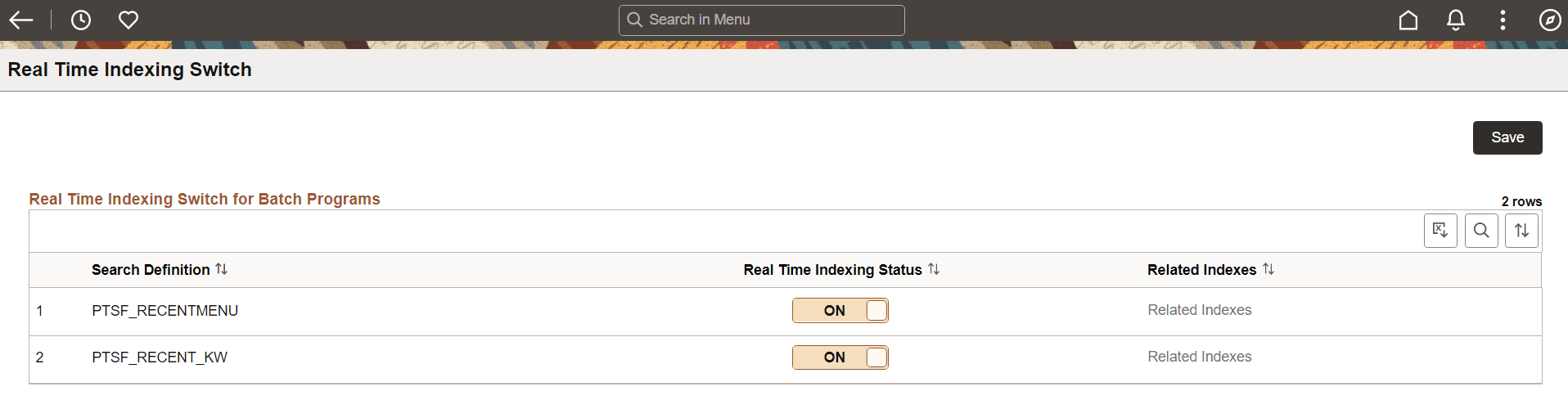
The Real Time indexing Switch page displays the current real-time indexing status of the listed search definitions. Administrators can use this page to check the real-time indexing status and turn it on or off only in scenarios where real-time indexing was not automatically turned on or off. Oracle recommends that administrators exercise caution before turning real-time indexing on or off on this page.
This example illustrates the fields and controls on the Real Time Indexing Switch page:
| Field or Control | Description |
|---|---|
|
Search Definition |
Displays the search definition’s name. |
|
Real Time indexing Status |
Displays the real-time indexing status of the listed search definitions. Administrators can check the status and turn it on or off only in scenarios where real-time indexing was not automatically turned on or off. |
|
Related Indexes |
Select the Related Indexes link to see all the related search definitions that share a common trigger record or template (In the case of Activity Guide search definition). |
Related Topics