Assigning Permissions to Roles
Access the Roles - Permission Lists page (select and click the Permission Lists tab).
This example illustrates the fields and controls on the Roles - Permission Lists page.
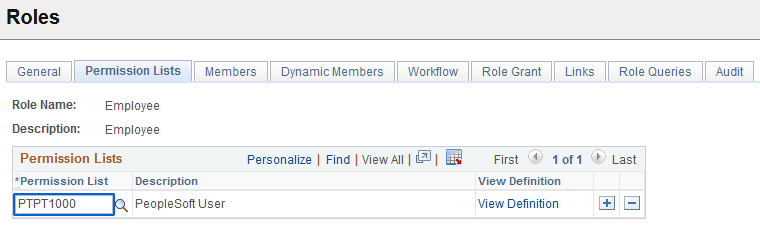
To add new permission lists to a role, add more rows. Remember that a user's access is determined by the sum of all the permission lists applied to each role to which the user belongs. For instance, suppose you add permission list X and permission list Y to a role. Permission list X has a sign-on time of 8 a.m. to 5 p.m. and permission list Y has a sign-on time of 1 p.m. to 9 p.m. In this scenario, the users assigned to this role can sign in to the system from 8 a.m. to 9 p.m. Always be aware of the contents of each permission list before adding it to a role.
| Field or Control | Description |
|---|---|
|
View Definition |
Click to open the permission list definition, where you can view the options in the permission to ascertain whether it is suitable for a particular role. |