Configuring Two-Factor Authentication Security Policies
The administrator uses the Security Policy Configuration page (PTMFASECPOLSRCH_FL) to configure a security policy that defines the parameters used in generating the TOTP.
Access the Security Policy Configuration page (select PeopleTools, then Security, then 2FA Administration, and then Security Policy).
Editing an Existing Security Policy
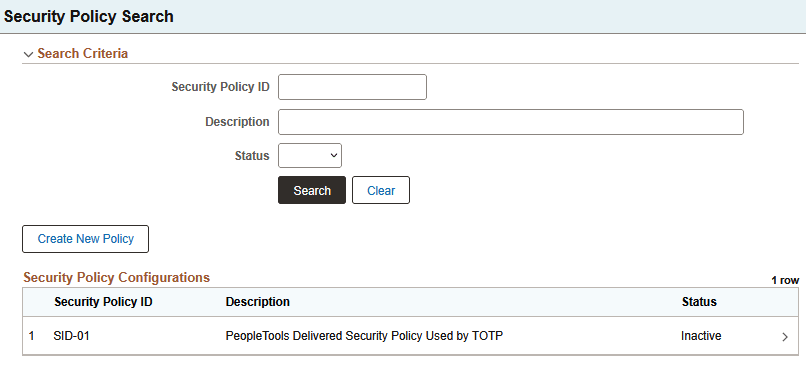
The page lists existing policies. There is one delivered policy, SID-01. Click the right arrow (>) to edit and activate a policy. The fields on the Security Policy Configuration page for an existing configuration are the same as those for creating a new one.
Creating a New Security Policy
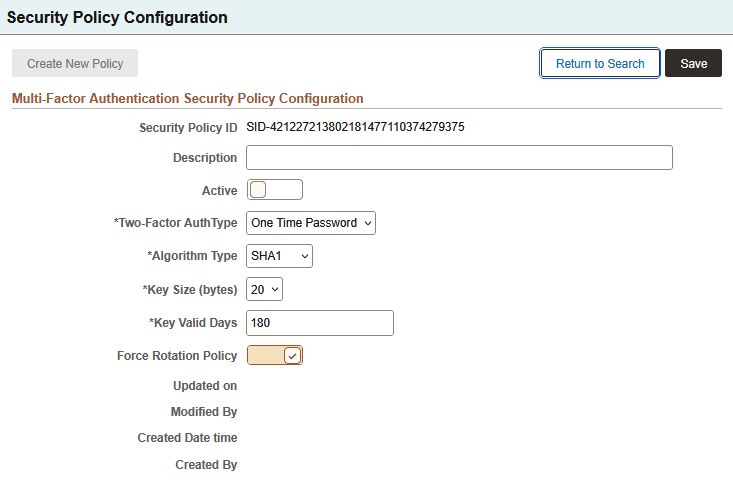
Click Create New Policy.
| Field or Control | Description |
|---|---|
|
Security Policy ID |
Displays the security policy ID. |
|
Description |
Enter an optional description. |
|
Active |
Select this option to make the policy active. |
|
Two-Factor Auth Type |
One Time Password is the allowed authentication type. |
|
Algorithm Type |
The algorithm type determines the key size.
Note: Microsoft Authenticator works well with the SHA-1 algorithm using a six-digit code. Users may potentially run into issues if they use an eight-digit code in SHA-1 or the six- or eight-digit codes in SHA-256. |
|
Key Size |
Key Size (bytes) |
|
Key Valid Days |
Specify how long the key will be valid. The default is 180 days. |
|
Force Rotation Policy |
When this is enabled, the key is automatically rotated at the end of the Key Valid Days period. |