Configuring Time-Based One-Time Passwords
The administrator must set up the configuration for time-based one-time passwords (TOTP) for end users.
Access the TOTP Configuration page (PTMFADMCONFIG_FL) (select PeopleTools, then Security, then 2FA Administration, and then TOTP Configuration).
Editing an Existing TOTP Configuration
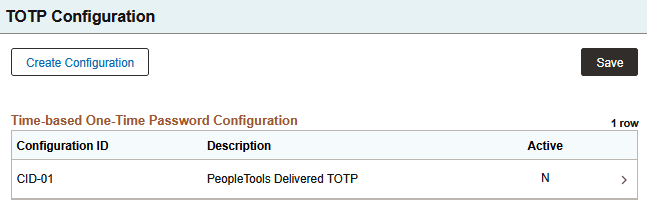
The page lists existing policies. There is one delivered policy, CID-01. To edit an existing TOTP configuration, click the right arrow (>). The fields on the Configuration Details page for an existing configuration are the same as those for creating a new configuration described below.
Creating a New TOTP Configuration
Click Create Configuration to supply details for a new configuration.
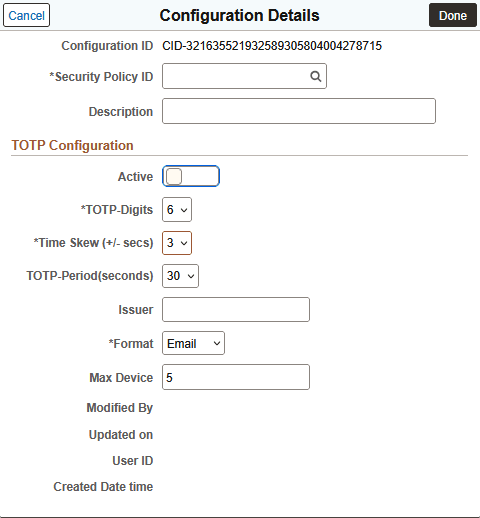
| Field or Control | Description |
|---|---|
|
Configuration ID |
The field displays the configuration ID. |
|
Security Policy ID |
Select a security policy. |
|
Description |
Enter an optional description. |
|
Active |
Select this option to enable the configuration. |
|
TOTP Digits |
Select the required number of digits for the one-time code. The allowed values are 6 or 8 digits. Note: Microsoft Authenticator works well with the SHA-1 algorithm using a six-digit code. Users may potentially run into issues if they use an eight-digit code in SHA-1 or the six- or eight-digit codes in SHA-256. |
|
Time skew (+/-) sec |
Select a number from 0 to 3 from the drop-down list. This accounts for slight differences in the clocks on various devices. This defines how much difference there can be when comparing the time on the server and on the user's device. |
|
TOTP-Period (seconds) |
Select 30 or 60 seconds as the time before the one-time code expires. |
|
Issuer |
Enter the name of an authentication provider that supports TOTP. |
|
Format |
Select Email or Subject. |
|
Max Device |
Enter the maximum number of devices that are supported by the configuration. The system maximum is five devices. |