Deleting the Directory Configuration
Access the Delete Directory page ().
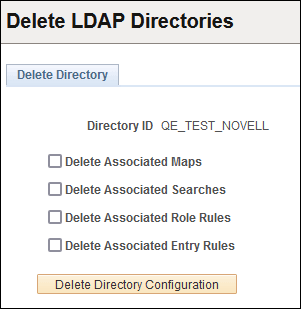
This example illustrates the fields and controls on the Delete Directory page.
| Field or Control | Description |
|---|---|
|
Delete Associated Maps |
Deletes the authentication and user profile maps from the configuration. |
|
Delete Associated Searches |
Deletes any searches related to the directory configuration. |
|
Delete Associated Role Rules |
Deletes any role rules that you have specified for a configuration. |
|
Delete Associated Entry Rules |
Applies to the PeopleSoft Directory Interface product only. |
|
Delete Directory Configuration |
After you have made the appropriate choices, click this button to perform the delete process. If you click this button with nothing selected, the system deletes only the directory ID and leaves all of the other configuration information intact. |