Working with the Workflow Address Book
Access the Address Book page ().
This example illustrates the fields and controls on the Address Book page.
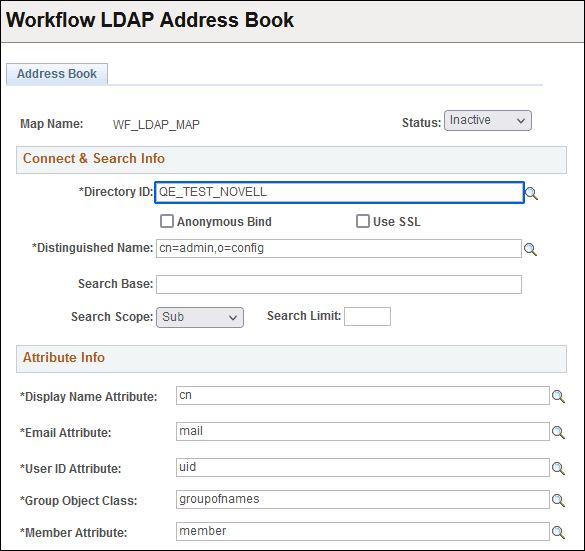
Use the Address Book page for configuring LDAP address lookups for use with user-initiated notifications in PeopleSoft Workflow. This page contains the controls needed to retrieve the necessary addresses from the directory. This page applies only if you store user information in a directory.
| Field or Control | Description |
|---|---|
|
Map Name |
Displays the name of the workflow address book map. |
|
Status |
Select Active or Inactive. |
Connect & Search Info
| Field or Control | Description |
|---|---|
|
Directory ID |
Select the directory ID of the directory that you intend to use for authentication. |
|
Anonymous Bind |
If all directory data required for authentication and user profile maintenance is visible to an anonymous connection, select this check box. |
|
Use Secure Sockets Layer |
Select this option if you are implementing an SSL connection between PeopleSoft and the directory. |
|
Distinguished Name |
Enter the distinguished name (DN) associated with the directory ID where you want to start the workflow address book search. |
|
Search Base |
Enter the root of the directory information tree under which the system should search for user information. |
|
Search Scope |
Select the search scope for this search. Values are: Base: Not applicable. You should not use Base on the authentication map. One: The query searches only the entries one level down from the entry in the Search Base field. Sub: The query searches the entire sub tree beneath the search base entry. |
|
Search Limit |
Enter the maximum number of search results to return. The maximum is 99999. |
Attribute Info
| Field or Control | Description |
|---|---|
|
Display Name Attribute |
Select the attribute to associate to the display name in the workflow address book. |
|
Email Attribute |
Select the attribute to associate to the email in the workflow address book. |
|
User ID Attribute |
Select the attribute to associate to the user ID in the workflow address book. |
|
Group Object Class |
Select the attribute to associate to the group object class in the workflow address book. |
|
Member Attribute |
Select the attribute to associate to the member attribute in the workflow address book. |