Registering an Identity Provider
Supply the required information for an Identity Provider (IdP).
Use the Identity Providers page to defines how PeopleSoft recognizes and trusts an external Identity Provider during SAML processing. This setup enables federated authentication by storing the IdP’s identifying information, metadata, certificates, and service endpoints. Each IdP configuration can be effective-dated, allowing safe updates and rollovers without disrupting live SAML integrations.
To register a new IdP:
- Select PeopleTools, then Security, then SAML Providers, and then Identity Providers.
- Enter the Identity Provider ID and IdP Entity ID.
- Paste or import the IdP metadata XML.
- Use Parse Metadata to populate certificates and endpoints where supported.
- Review signing, encryption, and metadata certificates.
- Review Single Sign-On, Single Logout, and Artifact Resolution endpoints.
- Save and activate the effective-dated row.
Here are guidelines for administering Identity Providers.
- Obtain entity IDs, certificates, and endpoint URLs from the IdP’s official metadata or administrative portal.
- Use metadata parsing where possible.
- Use future-dated rows for staged changes.
- Keep one default certificate and one default endpoint per category in normal operation.
- Review certificate expiration and endpoint validity periodically.
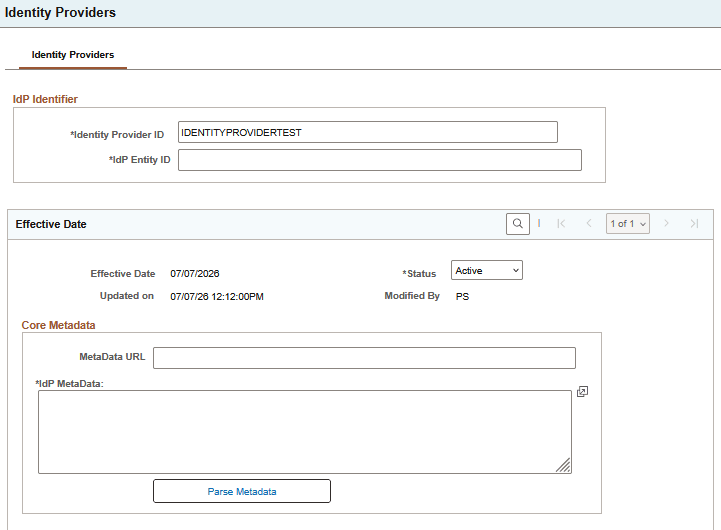
This example illustrates the Identity Providers page, 1 of 3.
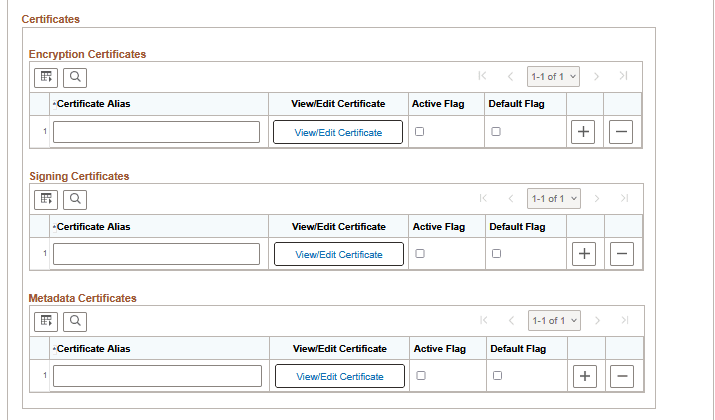
This example illustrates the Identity Providers page, 2 of 3.
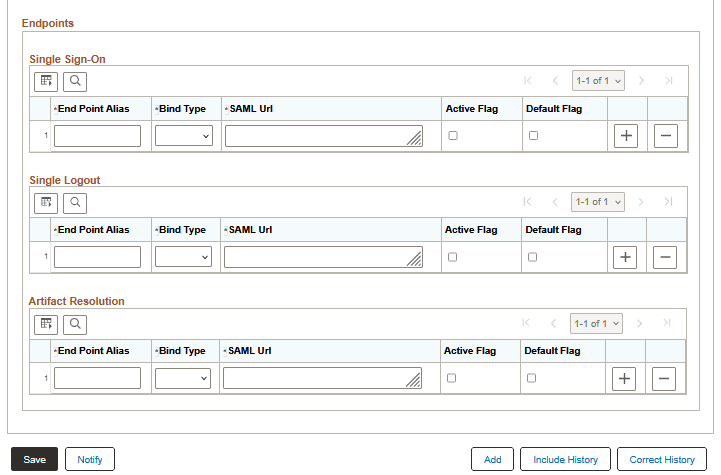
This example illustrates the Identity Providers page, 3 of 3.
IdP Identifier
The IdP Identifier section uniquely identifies the Identity Provider configuration.
| Field or Control | Description |
|---|---|
|
Identity Provider ID |
Specify a short descriptive name for theIdP. |
|
IdP Entity ID |
The globally unique SAML identifier for the Identity Provider. This value must match the IdP’s metadata exactly so incoming SAML messages can be associated with the correct trusted IdP. |
Effective Date
The Effective Date section establishes when the configuration becomes active. New rows are typically used for certificate rollover, endpoint changes, or metadata updates.
| Field or Control | Description |
|---|---|
|
Effective Date |
Standard PeopleSoft effective dating. Add a future-dated row to stage configuration changes safely. |
|
Status |
Select Active for the row that should be used for current processing. |
| Updated on |
Displays when the row was last updated. |
| Modified By |
Displays the operator ID of the last updater. |
Core MetaData
The Core MetaData section stores the IdP metadata source and metadata XML.
| Field or Control | Description |
|---|---|
|
MetaData URL |
The published metadata URL for the IdP, if available. |
|
IdP MetaData |
The IdP metadata XML. |
| Parse Metadata |
Click to parse supported information from the metadata and populates certificate and endpoint sections where possible. Metadata parsing is the preferred starting point when valid IdP metadata is available. If metadata cannot be parsed or is incomplete, the same information can be entered manually in the certificate and endpoint sections. |
Certificates
Certificates allow PeopleSoft to validate IdP signatures and, where applicable, support other trust-related certificate uses. The page organizes IdP certificates into three categories.
Encryption certificates are used when encryption is part of the IdP integration design.
Signing certificates are used to validate signatures on SAML responses or assertions received from the IdP. This is usually the most critical IdP certificate type, because it is used to verify that SAML messages came from the trusted Identity Provider.
Metadata certificates are used when validating signed IdP metadata.
When certificates are rotated, add the new certificate and make it active and default when appropriate. Keep older entries temporarily if needed during transition.
The controls in the certificates sections are similar.
| Field or Control | Description |
|---|---|
|
Certificate Alias |
Specify a short local name for the certificate row. |
|
View/Edit Certificate |
Click to open the certificate maintenance subpage. |
| Active Flag |
Select Active to indicate the certificate is active. |
|
Default Flag |
Select to indicate the default certificate for this category. |
Maintenance Subpages
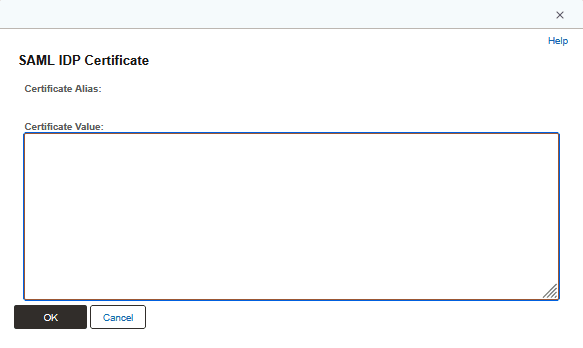
The View/Edit buttons open maintenance subpages. These subpages store the certificate and private key material referenced by the main configuration pages. The exact page title varies depending on context, but the purpose is consistent.
Endpoints
Endpoints define where PeopleSoft communicates with the Identity Provider when the corresponding SAML pattern is used by the integration. The endpoint rows store the IdP endpoint binding, URL, and active or default designation. Configuring an endpoint row does not by itself enable a SAML flow unless the related PeopleSoft service provider configuration and runtime processing support that pattern.
Single Sign-On endpoints define where authentication requests are sent.
Single Logout endpoints define the IdP logout endpoints to use when single logout is supported by the integration.
Artifact Resolution endpoints define the IdP artifact resolution endpoints to use when artifact resolution is supported by the integration.
| Field or Control | Description |
|---|---|
|
End Point Alias |
Specify a short local name for the endpoint row. |
|
Bind Type |
Select the SAML binding used for the endpoint. |
|
SAML Url |
Specify the full endpoint URL. |
|
Active Flag |
Select this option to indicate that the endpoint is active. |
|
Default Flag |
Select this option to indicate the default endpoint for this category. |