Setting Up a PeopleSoft Service Provider
Set up PeopleSoft as a Service Provider (SP).
Use the Service Provider page to define how PeopleSoft identifies itself and publishes its SAML capabilities to external Identity Providers. This setup controls how PeopleSoft sends authentication requests, receives responses, publishes metadata, and uses local signing or decryption key material. Each SP configuration can be effective-dated, allowing administrators to prepare rollover changes without disrupting current integrations.
To set up a PeopleSoft Service Provider:
- Select PeopleTools, then Security, then SAML Providers, and then Service Providers.
- Enter the Service Provider ID and SP Entity ID.
- Configure signing and encryption key pair rows.
- Use View/Edit Certificate to maintain the public certificate values.
- Use View/Edit Key to maintain the associated private key values.
- Create and assign the required Keyset ID in the PeopleTools Encryption Keyset component.
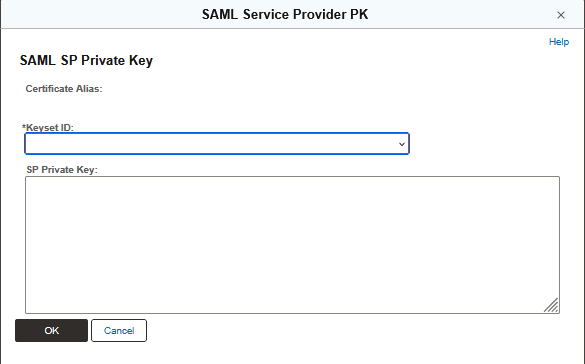
The private key value for a signing or encryption key pair is protected by the PeopleTools Encryption Keyset identified on the key maintenance subpage. Before saving private key material, create the required keyset in PeopleTools Encryption Keyset and verify that it is available in the current environment. For information about creating and maintaining encryption keysets, see the PeopleTools Encryption Technology documentation, Defining Algorithm Keysets.
- Define Assertion Consumer Service endpoints.
- Select supported NameID formats.
- Generate and save the SP metadata XML for exchange with partner IdPs.
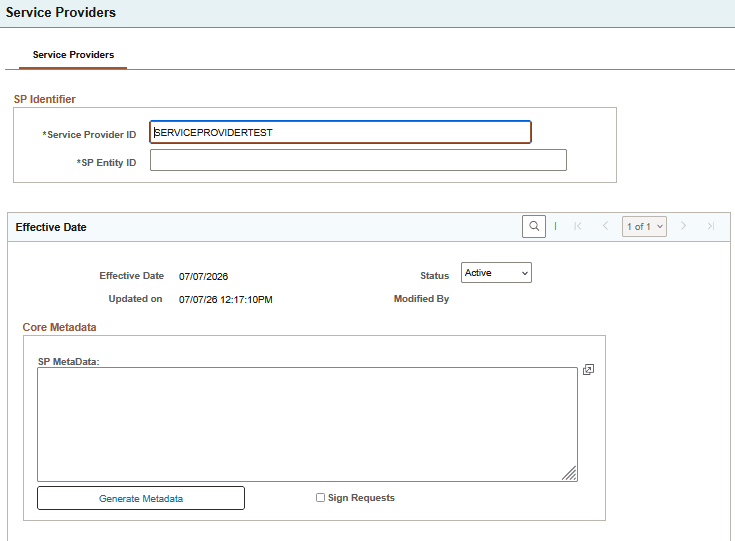
This example illustrates the Service Provider page, 1 of 3.
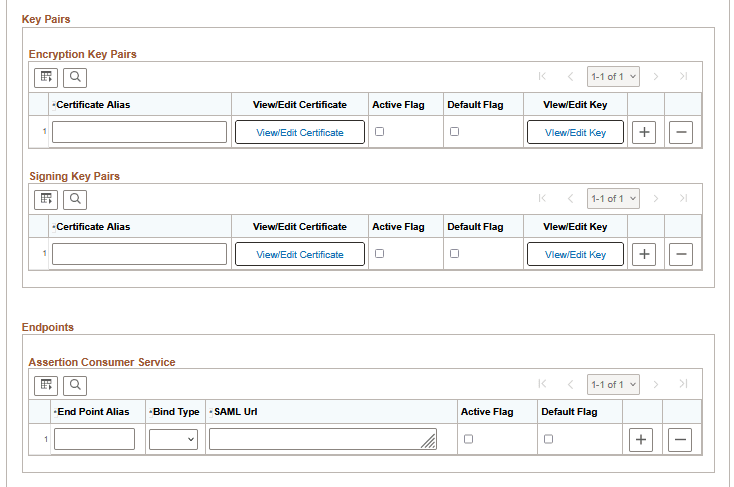
This example illustrates the Service Provider page, 2 of 3.
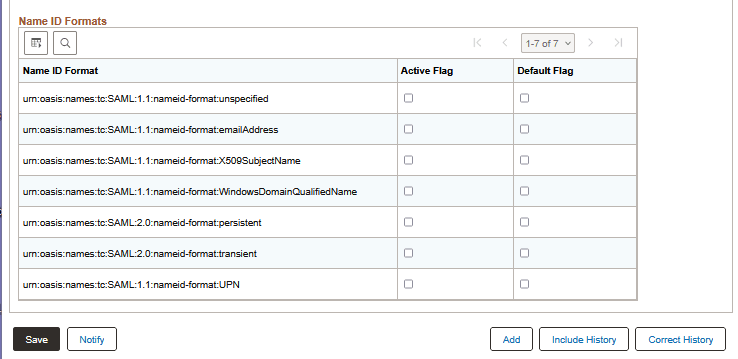
This example illustrates the Service Provider page, 3 of 3.
SP Identifier
The SP Identifier section uniquely identifies the Service Provider configuration.
| Field or Control | Description |
|---|---|
|
Service Provider ID |
Specify a descriptive name for the SP configuration. |
|
SP Entity ID |
Specify a globally unique SAML identifier used by external Identity Providers to recognize this PeopleSoft SP. The SP Entity ID should remain stable after trust relationships are established. |
Effective Date
The Effective Date section controls when a version of the SP configuration becomes active.
| Field or Control | Description |
|---|---|
|
Effective Date |
Standard PeopleSoft effective dating. |
|
Status |
Specify Active for the row currently in force. |
|
Updated on |
Displays when the row was last updated |
| Modified By |
Displays the last updating operator ID. |
Core MetaData
The SP metadata in the Core MetaData section represents PeopleSoft’s published SAML configuration.
| Field or Control | Description |
|---|---|
|
SP MetaData |
Displays the generated SP metadata XML. The generated metadata typically includes the SP Entity ID, configured endpoints, supported NameID formats, and active certificate material intended for publication. Updated metadata should be shared with partner Identity Providers whenever configuration changes affect trust. |
|
Generate Metadata |
Click to generate or refresh the SP metadata from the current configuration values. |
| Sign Request |
Select this option to force specification/processing of Signing Key Pairs. |
Key Pairs
Key pairs define how PeopleSoft signs outgoing SAML messages and, where applicable, decrypts encrypted SAML content. Each key pair row includes a certificate and an associated private key maintained through separate subpages.
Encryption Key Pairs
| Field or Control | Description |
|---|---|
|
Certificate Alias |
Specify a short local name for the key pair row. |
|
View/Edit Certificate |
Click to open the certificate maintenance subpage. See the Maintenance Subpages section later in this topic. |
|
Active Flag |
Select this option to indicate that the row is active. |
|
Default Flag |
Select this option to indicate the default encryption key pair. |
|
View/Edit Key |
Click to open the private key maintenance subpage. See the Maintenance Subpages section later in this topic. |
Signing Key Pairs
| Field or Control | Description |
|---|---|
|
Certificate Alias |
Specify a short local name for the endpoint row. |
|
View/Edit Certificate |
Click to open the certificate maintenance subpage. See the Maintenance Subpages section later in this topic. |
|
Active Flag |
Select this option to indicate that the endpoint is active. |
|
Default Flag |
Select this option to indicate the default signing key pair. |
|
View/Edit Key |
Click to open the private key maintenance subpage. See the Maintenance Subpages section later in this topic. |
Endpoints
Endpoints define where PeopleSoft receives SAML messages as part of SP processing. The Assertion Consumer Service section defines where PeopleSoft receives authentication responses from the Identity Provider.
| Field or Control | Description |
|---|---|
|
End Point Alias |
Specify a short local name for the endpoint row. |
|
Bind Type |
Select the SAML binding used for the endpoint. Only POST is allowed currently. |
|
SAML Url |
Specify the full endpoint URL. |
|
Active Flag |
Select this option to indicate that the endpoint is active. |
|
Default Flag |
Select this option to indicate the default endpoint for this category. |
Name ID Formats
The Name ID Formats section defines which NameID formats the SP supports. Multiple formats may be active, and one is typically designated as the default.
| Field or Control | Description |
|---|---|
|
Name ID Format |
Name format |
|
Active Flag |
Select this option to indicate that the NameID format is supported. |
|
Default Flag |
Select this option to indicate the preferred default format. |
Maintenance Subpages
The View/Edit buttons open maintenance subpages. These subpages store the certificate and private key material referenced by the main configuration pages. The exact page title varies depending on context, but the purpose is consistent.
This example illustrates the SAML Service Provider Private Key page.