Service Application - REST Provider
This section describes the case where PeopleSoft is the provider of the service.
Access the Service Application page (select ) and select the Resource Only button.
Based on this selection, the necessary fields are displayed for the administrator to populate.
This example illustrates the fields and controls on the Service Applications - Resource Only page.
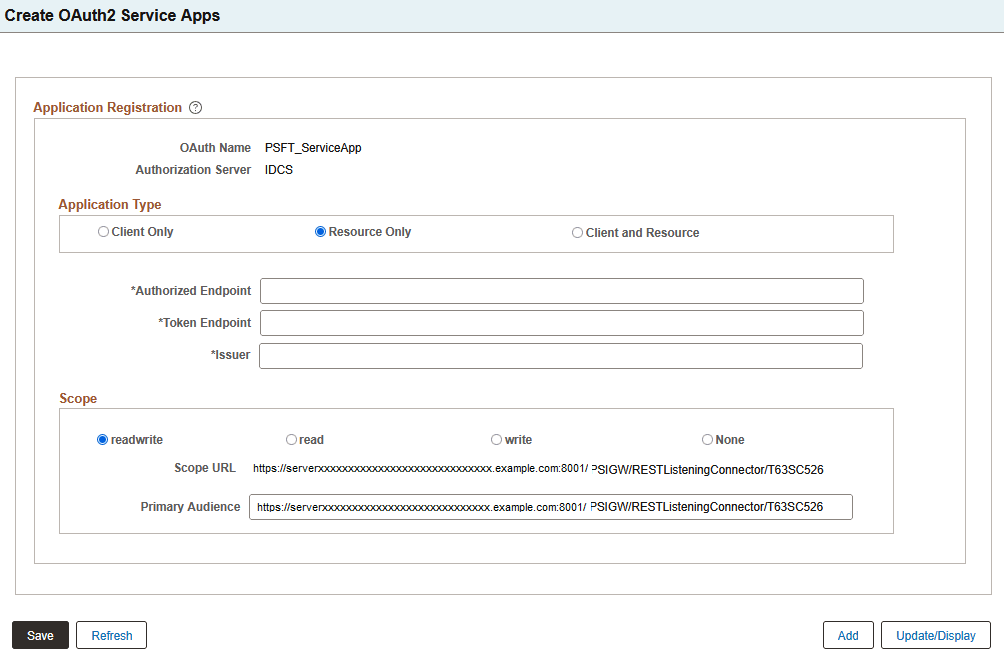
| Term | Definition |
|---|---|
|
Authorized Endpoint |
It is an HTTP endpoint that clients can use to identify a user or obtain an authorization code (which is then later exchanged for an access token) to be able to post to their website. The metadata endpoints for the different authorization servers are listed here. The metadata endpoint is where the authorized endpoint is published.
Note: If the system is upgraded from PeopleTools 8.58, the system administrator should ensure to enter the configuration data that is applicable to the specific OAuth server in use, because these values may change over time. |
|
Token Endpoint |
It is an HTTP endpoint that clients can use to obtain an access token. The metadata endpoints for the different authorization servers are listed here. The metadata endpoint is where the token endpoint is published.
Note: If the system is upgraded from PeopleTools 8.58, the system administrator should ensure to enter the configuration data that is applicable to the specific OAuth server in use, because these values may change over time. |
|
Issuer |
The issuer of the token. |
|
Scope |
This identifies the type of requests allowed. Valid choices are:
|
|
Scope URL |
This is an auto-generated URL based on the information defined on the Integration Broker Service Configuration page for Target Locations. |
|
Primary Audience |
This is the primary recipient where the token is processed. In this case it is the secure REST target location as defined on the Target Locations page. The administrator can append additional information to the URL to make it specific for a service operation. |
Gateway Configuration
For configuration as a Resource, the integration.properties file needs to be updated with additional OAuth 2.0 information. The following properties must be specified:
-
Cloud Site location used to validate OAuth2 token passed into REST Listening Connector:
-
ig.JSONWebKey: cloud site's JSON Web Key
-
ig.JSONWebKey=https://IDCS.tenant.instance.com/admin/v1/SigningCert/jwk
-
-
OAuth2 Client used for creating JWT-Bearer during Assertion Grant Type in HttpTargetConnector:
-
ig.AssertionKeyAlias=Client's KeyAliasName
-
ig.AssertionKeyPassword=Client's KeyAlias Password
-
-
Authorization Server used for Resources — currently supports IDCS, Azure, Okta, and Ping:
-
ig.AuthorizationServer:OAuth Server Type
-
ig.AuthorizationServer=IDCS
-
If you want to implement an authorization server that is currently not supported by the Integration Gateway framework, set the following option to TRUE:
ig.TurnOffOAuth2=FALSE
Note:
If you set this to TRUE, thereby disabling OAuth2, then any REST Provider Service Operation where the Req Verification is set to "OAuth2 Authentication" or "OAuth2 Authentication and SSL" will be rejected by the Integration Broker framework. If you elect to perform your own OAuth2 authentication or validation outside the Integration Broker framework you are responsible for updating the request validation option accordingly.
See Integration Broker Administration: Using the integrationGateway.properties File and Disabling OAuth2 Authentication for REST Service Operations.
Service Operation Configuration
These instructions are applicable for the supported authorization servers: IDCS, Azure, Okta, and Ping.
For REST provider service operations, additional options are available in the Req Verification drop down list box on the Service Operations Definitions page for:
-
OAuth2 Authorization: The integration partner must pass a valid access token.
-
OAuth2 Authorization and SSL: The integration partner must pass a valid access token and transmit the service operation using SSL encryption.
See Integration Broker: Managing Provider REST Service Operations.