Service Applications - REST Consumer
Consumer REST calls requiring a token will be supported by the security framework if the authorization server is IDCS (or Microsoft Azure for authorization code only). For any other authorization server, it will be up to the developer to make the necessary calls to obtain an access token.
The administrator creates a Service Application and registers information from the provider’s authorization server.
Access the Service Application page (select ) and select the Client Only button.
This example illustrates the fields and controls on the Service Applications - Client Only page.
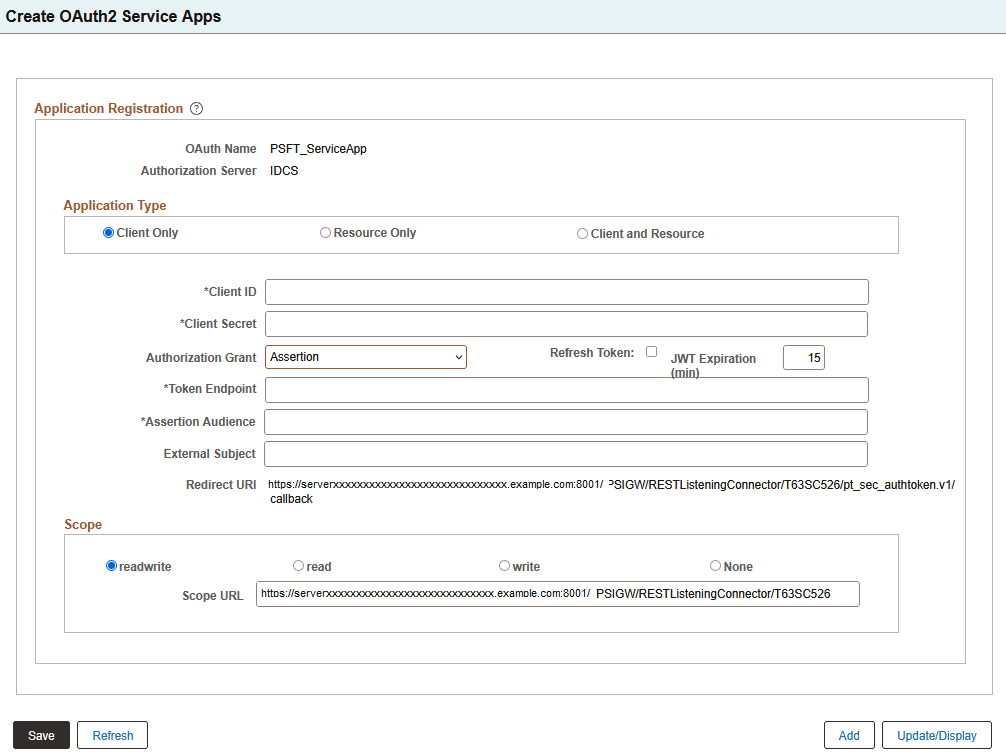
| Term | Definition |
|---|---|
|
Client ID |
The API key value generated when you registered your application with the OAuth server. |
|
Client Secret |
The secret key value generated from the OAuth server. |
|
Authorization Grant |
The Authorization Grant drop-down options are available only for the IDCS authorization server. Applications can request an access token to access protected endpoints in different ways, depending on the type of grant type specified in the client application. A grant is a credential representing the resource owner's authorization to access a protected resource. Currently PeopleSoft supports the following grant types:
For Azure, Okta, and Ping, Authorization Code is the only available authorization grant. See Authorization Grant Types for more information. |
|
Refresh Token |
Refresh tokens are credentials used to obtain access tokens. Refresh tokens are issued to the client by the authorization server and are used to obtain a new access token when the current access token becomes invalid or expires, or to obtain additional access tokens with identical or narrower scope (access tokens may have a shorter lifetime and fewer permissions than authorized by the resource owner). Note: The OAuth server needs to be configured to generate a refresh token along with an access token. |
|
JWT Expiration (min) |
Enter an expiration time in minutes for a JSON Web Token (JWT). The default is 15 minutes. This value is available for the Assertion grant type. |
|
Authorized Endpoint |
It is an HTTP endpoint that clients can use to identify a user or obtain an authorization code (which is then later exchanged for an access token) to be able to post to their website. |
|
Token Endpoint |
It is an HTTP endpoint that clients can use to obtain an access token. |
|
Assertion Audience |
The URL of the authorization server's token endpoint, specifying who the JWT is intended for. This value is available for Assertion grant type. Note: For IDCS, the URL must end with a forward slash. For example, https://identity.oraclecloud.com/. |
|
Issuer |
The issuer of the token. |
|
Redirect URl |
The URL is auto-generated based on the REST Target Location entry under Service Configuration. This URL should be copied and entered for IDCS to make the appropriate callbacks. |
|
Scope |
This identifies the type of requests allowed. Valid choices are:
|
|
Scope URL |
The scope URL is specific to the different authorization servers: For IDCS, the scope URL is auto-generated based on the information defined on the Service Configuration Target Locations page. For Azure, it is defined as Azure Resource-Client-ID. |
Gateway Configuration
For configuration as a client (consumer), when using the assertion grant type, the integration.properties file needs to be updated with additional information. This is applicable only to the IDCS authorization server.
The PeopleSoft private keys (client) used to retrieve the access token are:
-
ig.AssertionKeyAlias: The alias name defined for the private key enter into the key store.
-
ig.AssertionKeyPassword: The password defined for the private key.
See Integration Broker Administration: Using the integrationGateway.properties File and Managing Consumer REST Service Operations.