Specifying Mandatory User Properties
Access the Mandatory User Properties page (select and click the Mandatory User Properties tab).
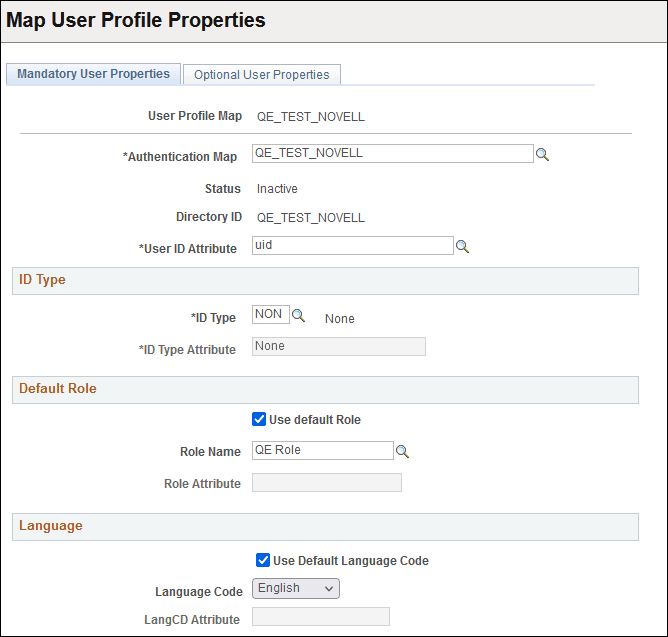
This example illustrates the fields and controls on the User Profile Map - Mandatory User Properties page.
| Field or Control | Description |
|---|---|
|
Authentication Map |
Select the authentication map to associate with this user profile mapping. The server and connection information are taken from the authentication map. |
|
Status |
Displays the status of the selected user profile map. Note: Only one user profile map should be active at any time. |
|
Directory ID |
Displays the directory ID associated with the authentication mapping. |
|
User ID Attribute |
Specify the LDAP attribute used to populate the OPRID (user ID) field on PSOPRDEFN. Important: If you specify a different value here than the Search Attribute value that you specified on the Authentication page, then users will not be able to switch to another application from the Go menu in PeopleSoft Windows clients such as Application Designer. The second application expects to automatically authenticate a user with the value of %SignonUserId, the system variable that contains the user ID that was used to sign in. However, because the value of OPRID is different from the value of %SignonUserId, the authentication fails with an error message. Users can still access any PeopleSoft Windows client by launching it directly and signing in using the same Search Attribute value for the user ID. |
ID Type
| Field or Control | Description |
|---|---|
|
ID Type |
Enter the default ID type for new users, such as Employee ID, Customer ID, and so on. This field is similar to Symbolic ID. |
|
ID Type Attribute |
Specifies the LDAP attribute in the directory that holds the selected ID value. For instance, the ID value might be Employee ID. Some ID types require additional data when creating a profile of that type. LDAP User Profile Management can retrieve that data from the LDAP directory if it is available. |
Default Role
| Field or Control | Description |
|---|---|
|
Use Default Role |
Select this option if you want to use the default role. If you enable this option, the Default Role field becomes available for entry while the Role Attribute field becomes unavailable for entry. You either specify a default role or specify an LDAP attribute on the user entry that holds the valid name of a PeopleSoft role. |
|
Role Name |
Enter the name of a default role to be assigned to new users. This value applies to users the first time that they sign in and have not had any roles dynamically assigned to them. Typically, this role has only basic access authorizations, such as for only the self-service pages. Users should get most of their permissions through dynamically assigned roles. |
|
Role Attribute |
Instead of specifying only a single default role for each and every user, you can enter a value for the LDAP attribute that holds the name of a PeopleSoft role to be assigned to the user. |
You can enable your application to automatically apply a role for the user. When signing in to the application, the user provides a value for the search attribute you specified in the authentication map. The system uses that attribute value to search for the user's entry in the LDAP directory, and then imports the groups containing the entry to the PSOPRDEFN table as the user's role.
To enable this automatic role import feature:
-
Define LDAP groups with names that exactly match the roles defined for your application and assign the user to groups.
-
Deselect the Use Default Role check box on this page.
-
Leave the Role Name and Role Attribute fields on this page blank.
Language
| Field or Control | Description |
|---|---|
|
Use Default Language Code |
Select if you do not maintain language codes in the directory. |
|
Language Code |
If the default language code is not stored in the directory, select a default value from the drop-down list box. |
|
LangCD Attribute (language code default) |
The name of the LDAP attribute containing a valid language code. The value retrieved from the attribute must be a valid PeopleSoft language code. |