Using the Define Personalizations – Definition Page
To access the Define Personalizations – Definition page, select and click the Definition tab.
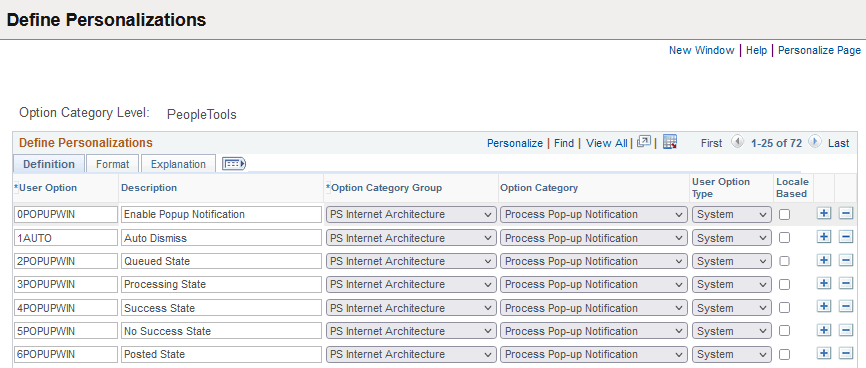
This example illustrates the fields and controls on the Define Personalizations – Definition page. You can find definitions for the fields and controls later on this page.
| Field or Control | Description |
|---|---|
|
User Option |
Displays the code associated with the user option. This is the code that the system (PeopleCode) recognizes at run time. |
|
Description |
This is the description of the option that the end user sees on the My Preferences - General Settings interface. The description should be unique within the same category. When adding custom personalizations, special attention needs to be paid to this field. Make sure the description is meaningful to end users. |
|
Option Category Group |
Specify the product or functional groupings of options. This value acts as an administrative attribute providing ownership for maintenance purposes. It further divides the Option Category Level. |
|
Option Category |
Categorizes and encompasses a set of options for the end user. The category you choose from the drop-down list determines the navigation panel item the end user selects to view and modify the option. You add new Categories using the Category page. |
|
User Option Type |
Enables you to set where an option is exposed to the end user for override purposes. There are two types:
|
|
Locale Based |
Indicates that the option derives the default values based on the Locale of the browser. |
To add an option, click the insert row (+) button. To delete an option, click the delete row (-) button.
Note:
If you add any custom values for these fields, complete all the appropriate planning beforehand. There is no built-in mechanism to prevent collisions.
Note:
In the My Preferences - General Settings interface, end users see only options that possess the following attributes: the User Option Type is set to System and permission to override that option is granted by one of the users' assigned permission lists.