Using the Group Content Summary Page
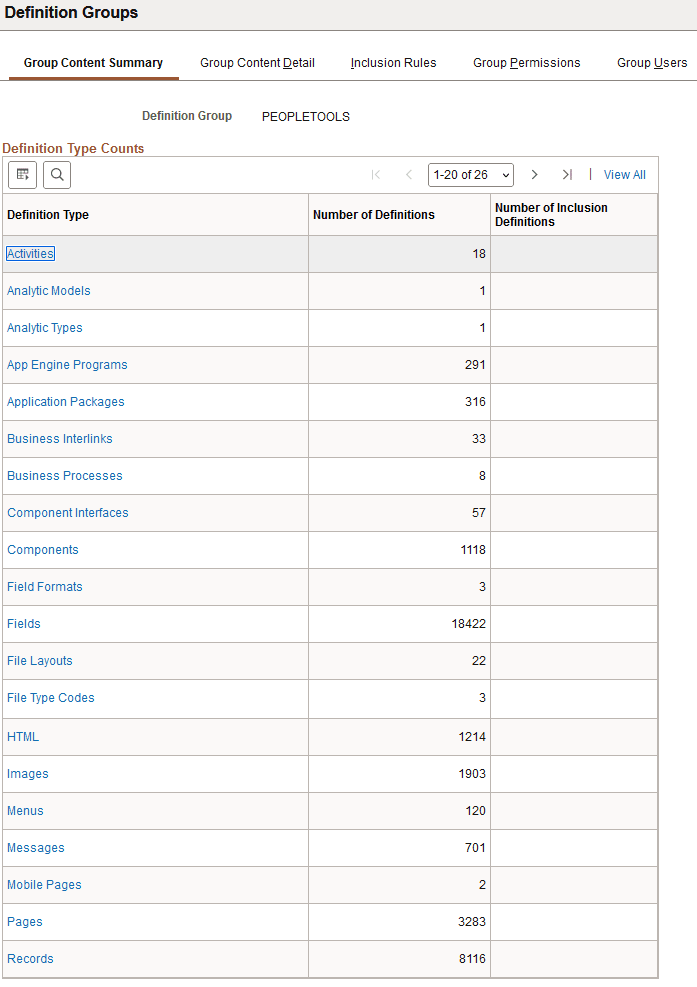
Use the Group Content Summary page (PTDEFSECCNT) to view the following information for a selected definition group:
-
Definition types in the group.
-
Number of definitions of each type in the group.
-
Number of definitions that have been dynamically included in the group through inclusion rules.
To access the page select Select and search for and select a definition group.
This example illustrates the fields and controls on the Group Content Summary page. You can find definitions for the fields and controls later on this page.
| Field or Control | Description |
|---|---|
|
Definition Type |
Displays the object or definition type name. Click the link to access the Group Content Detail page to view a list of specific definitions included in the definition group. |
|
Number of Definitions |
Displays the number of definitions in a definition group for a specific definition type. |
|
Number of Inclusion Definitions |
Displays the number of definitions in a definition group added using inclusion rules. |