Viewing the Product Summary
Access the Product Summary page.
This example illustrates the fields and controls on the Product Summary page. You can find definitions for the fields and controls later on this page.
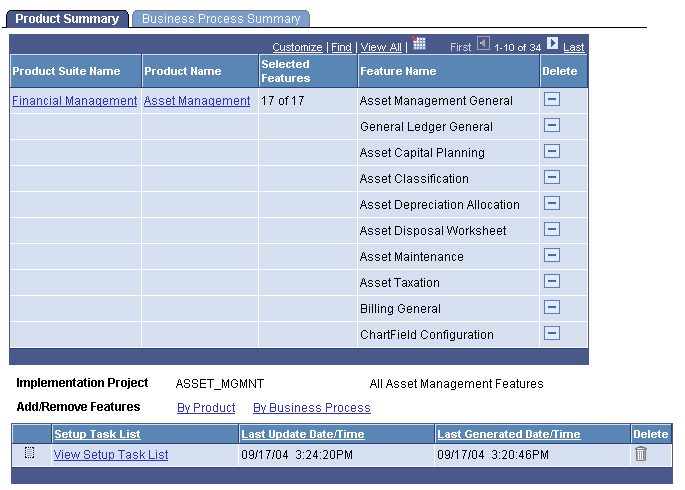
The names of the product suites and products on this page are links to the Product List page and the Product Features page, on which you can view and edit the list of features that you want to implement.
| Field or Control | Description |
|---|---|
|
Product Suite Name |
Click the name of the product suite to view the Product List page. |
|
Product Name |
Click the name of the product to view the Product Features page. |
|
Selected Features |
Displays the number of features selected for implementation out of the total possible features for that product. |
|
Feature Name |
Displays the name of the feature as defined by PeopleSoft development. |
|
Required |
A red star appears in this column if the feature is required for this product. |
|
Delete |
Click to delete this feature from the implementation project. This action is enabled only for non-required features. Any feature that you delete from the Product Summary page is also deleted from the Business Process Summary page. |
|
Implementation Project |
Displays the name of the implementation project. This field is not populated until you save the implementation project. |
|
Add/Remove Features |
Click the By Product link to display the Product List page, on which you can add and remove features. Click the By Business Process link to display the Business Process List page, on which you can add and remove features. |
|
Save and Regenerate |
Click to start the process that creates the setup task list. This button is not available for selection until the implementation projects has been saved. |
Note:
If you remove a feature from this page, the system also removes the feature from the Business Process page.