Creating Internal Partner IDs
To access the Ec Int Partner Def (Internal Partner Definition) page, select
This example illustrates the fields and controls on the Ec Int Partner Def page.
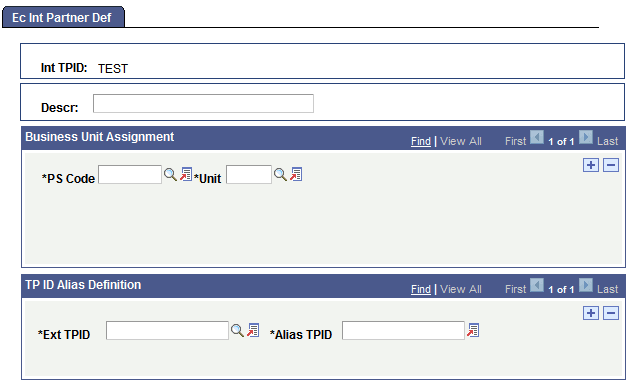
You assign trading partner IDs to the internal entities (business units) that external trading partners need to be able to submit transactions to. Because of the way each PeopleSoft Financials application tracks its own set of business units, a single trading partner ID can refer to multiple business unit IDs, all of which actually refer to the same physical business unit. Use this page to specify which internal business entities share this partner ID and which external trading partners do business with this partner.
To create an internal partner ID:
-
Specify to which business entity or entities this trading partner ID applies.
In the PS Code field, select the entity code for the type of business entity, and then select the specific entity in theUnit field.
Because the same business unit can be referred to by different business unit IDs in different PeopleSoft Financials applications, you can add multiple units to the same trading partner ID.
-
Specify which external trading partners work with this internal trading partner, and what name they use to refer to the internal partner.
In the Ext TPID field, select the name of an external trading partner that does business with the internal partner that you are defining. Then, in theAlias TPID field, enter the name by which the selected external partner refers to the internal partner, that is, the text that will appear in the Internal Trading Partner field in PeopleSoft business documents.
Note:
If you haven’t defined your external trading partners yet, you’ll need to return to this page after you add them.
Repeat this procedure for each external trading partner.