Creating Transaction IDs
Select to access the Transaction Definition page.
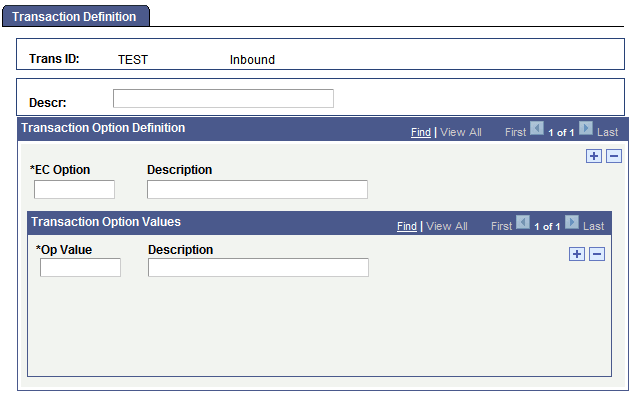
This example illustrates the fields and controls on the Transaction Definition page.
To define a transaction:
-
Add a new value and enter a unique EC transaction ID as it will appear in PeopleSoft business documents.
-
Specify whether you are setting up an ID for inbound or outbound transactions.
Note:
If you support both inbound and outbound transactions of the same transaction type, you must define two transaction IDs.
-
Click the Add button.
The Transaction Definition page appears. You use this page to define the transaction and specify any special transaction parameters.
-
Enter a description of the transaction in the Descr (description) text box.
The description appears in list boxes when you need to select a transaction ID.
-
Enter the name of a transaction option that the application load or application extract process uses.
Use the EC Option text box to specify a transaction parameter that the system will use when it copies data from the electronic commerce staging tables to the transactional application tables.
-
Enter the valid transaction option values for the transaction option.
List the valid values in the Op Value field for the transaction option that you specified in the previous step. Add a row for each option value. When you define a trading partner, you will specify which of these values to use for that partner. In this way, the application load or application extract process can handle the transaction differently depending on the trading partner that it comes from.
Repeat steps 5 and 6 to define additional transaction options.