Setting Profile Defaults
Access the Partner Profile - Profile Defaults page.
This example illustrates the fields and controls on the Partner Profile - Profile Defaults page.
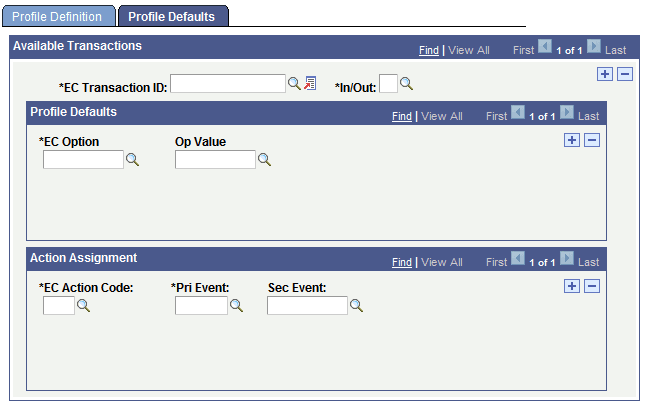
Use this page to specify which transactions a partner with this profile can perform and how the EDI agent converts event codes into action codes for each transaction. If a transaction has transaction options associated with it, you also specify which value to assign to that option for partners with this profile.
To set profile defaults:
-
Select a transaction type that partners with this profile can perform.
Select the transaction ID in the EC Transaction ID field. Specify whether it is an inbound or outbound transaction by selecting I or O in theIn/Outfield.
-
If the transaction type has transaction options associated with it, specify which value to use for each one in the Profile Defaults group box.
When you define a transaction type, you can specify transaction options that the system uses when it copies data between the electronic commerce staging tables into the transactional application tables. If the transaction type that you are adding includes options, specify which of the available values for that option the EDI agent should use for partners with this profile.
Note:
Most transaction types do not have any options, and you can bypass this step.
Select the option in the EC Option field. Then, select one of its valid values in theOp Value field. Repeat this step for each defined transaction option.
-
Specify which action code to use for each pair of primary and secondary event codes.
The controls in the Action Assignment group box enable you to specify how the EDI agent translates between the event codes in a PeopleSoft business document and the action codes in the electronic commerce staging tables.
Select one of the defined action codes in the EC Action Code field, and then select the primary and secondary event codes that map to this action code. If this transaction type uses only a primary event code (Pri Event field), you can leave the Sec Event (secondary event) box empty.
Repeat this step to define each possible action code and combination of primary and secondary event codes for this transaction type.
-
Repeat steps 1 through 3 for each transaction type that partners with this profile can perform.
Related Topics