Logically Separate Server Configuration
A logically separate server environment means that multiple servers share the same physical machine. The servers are logically, but not physically, separate.
The following diagram depicts a logical configuration with two server machines. One server contains the web server, and the other contains the application server and database server:
The following diagram depicts a logical configuration with two server machines. One server contains the web server, and the other contains the application server and database server:
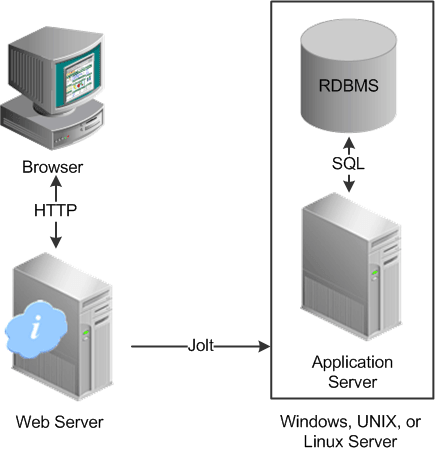
The solid line surrounding the application server and the database server represents one physical machine.
Although this diagram depicts a separate web server, the web server software could also reside on the same machine with both the application server and the database server. When installing multiple PeopleSoft architecture elements onto the same machine, the only requirement is that each element be supported by the underlying operating system.
If all servers are located on the same machine, however, you should consider security and performance issues. If you're deploying PeopleSoft applications to the internet, you will most likely want your web server outside of your network firewall and not on the same machine as the database server. Generally, having your application server on the same physical machine as the database server provides the best performance as this configuration has no network layer between the application server and the database.
Note:
For development, testing, or training purposes, you might want to have all PeopleSoft architecture elements (or as many as possible) on the same server machine.