Manage Attachment Repositories
Select to access the Manage Attachment Repositories page.
This page enables you to manage your attachment archives. You can transfer file attachment archives from one location (source) to a new location (destination), and you can perform general housecleaning by deleting orphaned attachments.
This example illustrates the fields and controls on the Manage Attachment Repositories page. You can find definitions for the fields and controls later on this page.
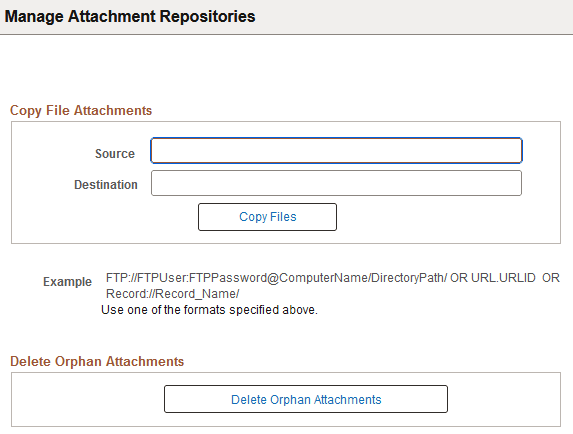
Copy File Attachments
| Field or Control | Description |
|---|---|
|
Source |
Enter the URL that corresponds to the current (source) location of the file attachment archive to be copied. |
|
Destination |
Enter the URL that corresponds to the destination location of the file attachment archive to be copied. |
|
Copy Files |
Invokes the PeopleCode function (CopyAttachment) that copies the file attachment archive from the specified source storage location to the specified destination storage location. For example, you can copy from the FTP server to a database, a database to the FTP Server, and so on. Note:For the file attachment functionality, in specifying the URL for the FTP server, the FTP server's machine name can be more than 30 characters. The length of the full URL is limited to 120 characters. Prior to copying files to a database storage location, you must first prepare the target record to store the attachments, which is discussed in the PeopleCode Developer's Guide. See PeopleCode Developer’s Guide: Understanding the File Attachment Functions. |
|
Example |
Displays the sample formats used for FTP, URL, or Record attachment transfers. These sample formats apply to both the Source and Destination edit boxes. |
Deleting Orphan Attachments
The accumulation of file attachments can consume a significant amount of space in your database. Therefore, on a regular basis, it is recommended that you make sure that orphaned file attachments are deleted from the storage location, reclaiming disk space being used unnecessarily. Orphan file attachments are stored file attachments for which there is no longer a corresponding file reference in a valid file reference table.
Click the Delete Orphan Attachments button to complete this task. This button invokes the CleanAttachments PeopleCode function.
WARNING:
There is no way to roll back changes made by the CleanAttachments function. Review the PeopleCode Language Reference product documentation describing the behavior of CleanAttachments in order to appropriately anticipate how it will behave. Oracle suggests that you perform a database backup before deleting orphan attachments.
Note:
When large numbers of orphaned file attachments may exist, Oracle recommends using the delivered Application Engine program, CLEANATT84, rather than the Delete Orphan Attachments button to remove the orphaned files. This avoids potential time-out issues.
See PeopleCode Language Reference: CleanAttachments function