Message Catalog
Select to access the Message Catalog page.
This example illustrates the fields and controls on the Message Catalog page. You can find definitions for the fields and controls later on this page.
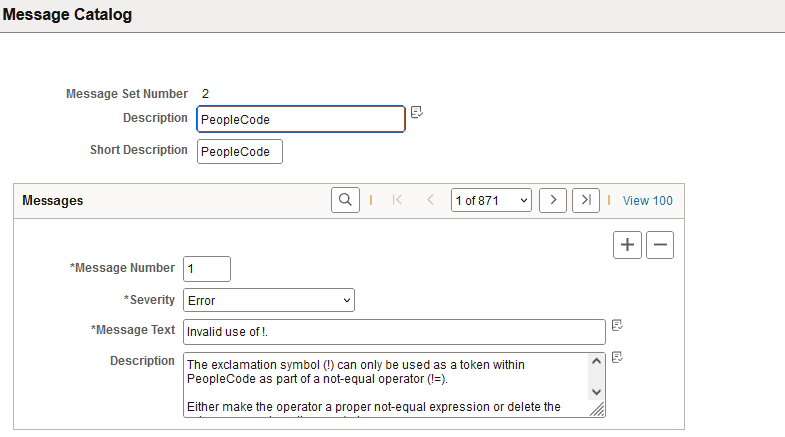
You add and maintain system messages by using the Message Catalog page. PeopleSoft error messages are stored in the Message Catalog, and organized by message set number. Each message set consists of a category of messages, ranging from PeopleTools Message Bar Items and PeopleCode Runtime Messages to PeopleSoft Payroll and PeopleSoft General Ledger application messages.
| Field or Control | Description |
|---|---|
|
Message Set Number |
Identifies the message set. |
|
Description |
The Message Set Description is a reference that is used on reports and pages for easy identification. |
|
Short Description |
The Message Set Short Description is a reference that is used on reports and pages for easy identification. |
|
Message Number |
Each message set consists of one or more rows of messages that are identified by a message number. |
|
Severity |
You assign each message a severity, which determines how the message appears and how the component processor responds after the user acknowledges message. The severity levels are: Cancel: This severity should be reserved for the most severe of messages, as when a critical error occurs and the process must be aborted or a machine needs to be shut down. To indicate how rarely this severity level is appropriate, of all PeopleTools messages only five or so have a severity level of Cancel. In almost all cases, you use one of the other severity levels. Error: Processing stopped, and data cannot be saved until the error is corrected. Message: This is an informational message and processing continues normally. Warning: User can decide to either stop or continue processing despite the error. |
|
Message Text |
In the Message Text edit box, you see the message text. Any reference to the characters %n, as in %1 or %2, is replaced by parameter values that the system provides. |
|
Explanation |
The Explanation text provides a more in-depth explanation of why the message is generated and how to fix the problem. This text appears below the Message Text when the message appears. |
PeopleTools uses some messages, but the applications use the other messages, which get called by the Error, Warning, Message Box, MsgGet, and MsgGetText built-in PeopleCode functions.
Note:
You can create messages and message sets to support new or customized functionality in the system. You can also edit the messages that PeopleSoft delivers if required. In both of these cases, remember that Oracle reserves all message sets up to 20,000 (that is, 1 to 19,999). If you add a message set or edit a message set with a number that is less than 20,000, it may be overwritten in future upgrades. Message sets must not exceed 32,767, and PeopleSoft recommends that you use message sets from 20,000 to 30,000 to create new messages.
To add a message set:
-
Select Utilities, Administration, Message Catalog, and on the search page click Add New Value.
-
Enter the value of the new Message Set Number and click OK.
-
Enter a description and short description of the type of messages that this message set contains.
Try to group the messages logically. For instance, create one message set for the new budgeting application and a different one for the customized billing pages.
-
Add messages.
-
Save your work.
To add a message:
-
Select .
-
Open the desired message set.
-
In the Message Catalog page, click the plus sign button to add a new row.
The Message Number value is automatically set to the next unassigned number in the message set.
-
Select a Severity level, enter message text and a detailed explanation.
-
Save your work.