Defining Tree Details
Use the Tree Details page (PSTREESTRCTDETL) to define the application data and component used to maintain the detail values for your tree.
Note:
This page should only be filled in for structures that you plan to use for detail-value trees (summer trees). This page is not applicable to node-only trees.
Navigation:
This example illustrates the fields and controls on the Tree Details page. Definitions for the fields and controls appear following the example.
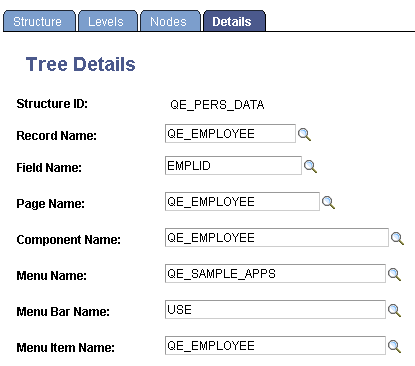
Enter the name of the page, component, record definition, and key field name that will be used when adding or updating the application data for a detail value. For example, if each detail value represents a department, use a page, component, and menu path that enables you to create and update department information.
Click the Save button to save your new detail tree structure.
Note:
When the PeopleSoft Tree Manager searches for values for dynamic detail and detail ranges, the search is based first on the override search record specified on the detail menu. By doing this, the values displayed are only those that the user would normally have access to through the Application component. If an override search record is not specified on the menu, then the system uses the component’s search record. If there is no component search record, the system uses the tree structure detail record.
Unlike the level and node information, there is no standard page and record for detail values. These are always built on application-specific tables.