Defining Node Properties
Use the Tree Nodes page (PSTREESTRCTNODE) to specify the page and record used to enter and store information about tree nodes. The Tree Nodes page of a new tree structure includes default values, which are similar as in the Tree Levels page.
Navigation:
-
Select .
-
Search for an existing tree structure or create a new one.
-
Select the Nodes tab on the Tree Structure Properties page.
This example illustrates the fields and controls on the Tree Nodes page.
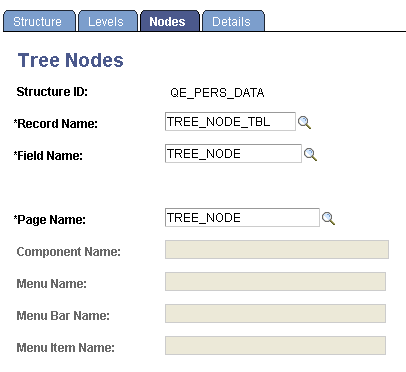
Enter the record name, field name, and page name to use for entering and storing information about tree nodes.
For a node-only tree, where each node represents a detail value, use the page, record definition, and field that correspond to the detail value you’re entering. For example, if each node represents a department (as in the Department Security table), use the DEPARTMENT_TREE page, the DEPT_TBL record definition, and the DEPTID field. You would also identify the component that the DEPARTMENT_TREE page belongs to, as well as all of the menu information.
Note:
If you are creating a business unit or user-defined key tree structure, the Tree Nodes page displays a field for entering the business unit or user-defined key field.
If the TREE_NAME field exists in the User Node table, then the User node data (node descriptions, and so on) cannot be shared between trees with different names. For this reason, if you copy a tree using the Save As function in PeopleSoft Tree Manager or the Copy function in the Copy/Delete Tree utility, and user node table includes the TREE_NAME field like one of the key fields, you must manually insert the new tree's node descriptions.