Deleting Tree Structures
Use the Tree Structure Maintenance page (PSTREESTRCTMAINT) to copy a tree structure, delete a tree structure, or view a tree structure.
Navigation:
Select
This example illustrates the fields and controls on the Tree Structure Maintenance page. Definitions for the fields and controls appear following the example.
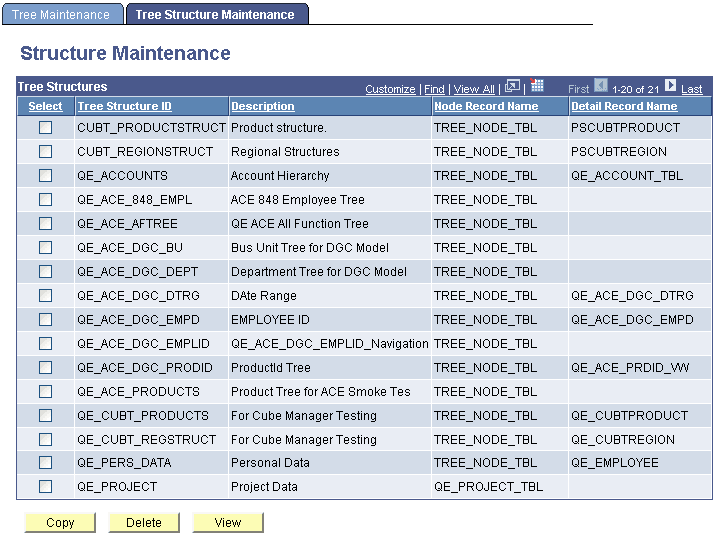
| Field or Control | Description |
|---|---|
|
Node Record Name |
Displays the name of the record that stores information about the tree nodes. |
|
Detail Record Name |
Displays the name of the record definition that corresponds to the kind of detail value in the structure. |
|
Copy |
To access the Copy Tree Structure page and copy a structure, select a structure check box, and click this button. |
|
Delete |
To delete a tree structure, select its check box and click this button. You cannot delete a structure that is currently being used by a tree. |
|
View |
To access the Tree Structure Properties page and view a structure, select a structure check box and click this button. |
Note:
Tree structures secured by PeopleSoft Object Security for anything but full access are not listed and cannot be updated or deleted from the Tree Structure Maintenance page.