Using Navigation Paths
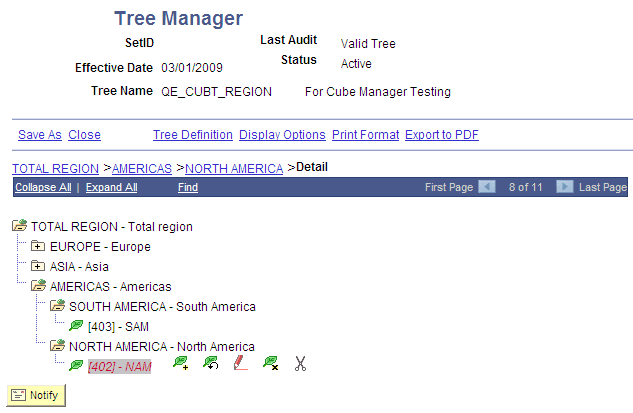
As you navigate through your tree, navigation paths appear above the navigation bar. They show you the parent/child relationships between the currently-selected object and its parents. Navigation paths can provide you with a basic map of your route through the tree.
When you hover your cursor over a navigation path, a tooltip appears that identifies whether the navigation path is a link to a branch or a node.
Navigation path represent nodes in the current branch (A type nodes) and the parent branch of the opened branch (B type nodes).
In this illustration, node TOTAL REGION is the parent branch of AMERICAS; AMERICAS is the parent node of NORTH AMERICA and SOUTH AMERICA; and NORTH AMERICA is the parent node of 402-NAM.
The maximum number of entries in a navigation path displayed is seven. When you start exceeding that number, the system automatically removes the earlier ancestor nodes. This ensures that navigation paths always begin with the parent node of the currently selected node.