Specifying Additional Approval Rule Properties
This section describes how to specify additional approval rule properties.
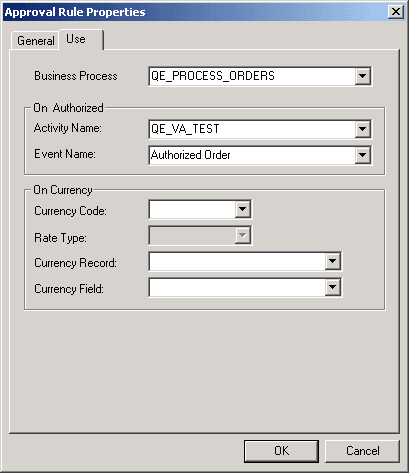
This example illustrates the fields and controls on the Approval Rules Properties dialog box - Use tab.
To specify additional approval rule properties:
-
Select the Use tab.
Enter the name of the business process that is associated with this rule set.
Although approval rule sets are not represented by physical icons on workflow maps (business processes and activities), the approval process that you’re defining is part of a workflow business process. Enter the name of that business process here. This information is required when you use Virtual Approver.
When you add PeopleCode to call Virtual Approver from the transaction page, this business process is one of the input parameters.
-
Specify the event to trigger when all required approvals have occurred.
Note:
This information is for Virtual Approver only; the GetApprovers function disregards this information.
In the On Authorized group box, enter an activity name (associated with the business process that you’ve specified) and event name to specify which event should be triggered when the transaction is fully approved. Virtual Approver triggers this event when final approval occurs. For example, after a purchase requisition is approved, it is logical to trigger an event that notifies a buyer that the approved requisition is ready to be fulfilled.
PeopleSoft Application Designer enables you to deactivate individual business events. If you deactivate an event that Virtual Approver is supposed to trigger, the event isn’t triggered.
An On Authorized activity or event is optional. Try to avoid using the same activity or event as on the individual step's On Pre-Approved field.
-
Specify currency units for the approval rules.
Enter currency information only if the approval rules are based on monetary amounts in the transaction.
Enter the currency code and rate type that are used in your approval rules. For example, if a rule requires approvals for amounts over 1000 USD, enter USD.
-
Specify the currency unit for the transaction.
Specify the currency record and currency field name that store the currency code for the data to be evaluated. For example, to evaluate whether a requisition requires approval, you must know the amount of the requisition and the currency in which that amount is expressed.
Note:
If the currency that is specified for the transaction being processed is different from the currency that is specified for the approval rule, Virtual Approver performs the appropriate currency conversion before making the comparison.
-
Click OK to close the properties dialog box.
-
Add approval steps to the rule set.
-
Save the approval rule set.