Coherence Server Health Check
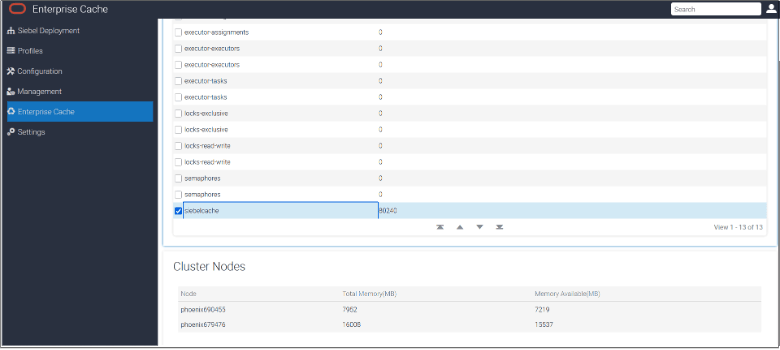
After deploying the Coherence Server, you can verify that it is up and running by checking its status in SMC under the Enterprise Cache tab. This page displays the total number of cache entries, the number of nodes on the cluster, the total memory allocated to each Coherence Node, and the available memory in megabytes . If a Coherence node is down, its entry will be missing from this page. This node information is dynamic and reflects the current state. To view the latest information, refresh the SMC Web Page.
You can also verify if it's up and running by interacting with the cache using the Coherence Console.
Run the following command to start the Coherence console. Once inside, use the command
cache <cacheName> to connect to the cache. If successful, the
cache configuration details will be displayed. The help command
provides details about available commands for interacting with the Coherence Server,
such as get <key>, put <key>, and more.
java.exe -server -showversion -Dcoherence.pof.enabled=true -
Dcoherence.distributed.localstorage=false -Dcoherence.management=all -
Dcoherence.management.remote=true -
Dtangosol.coherence.cacheconfig=<SIEBEL_ROOT>\ses\applicationcontainer_internal\webapps\cgcohconf\coherence-cache-config.xml -
Dtangosol.coherence.override=<SIEBEL_ROOT>\ses\applicationcontainer_internal\webapps\cgcohconf\custom-override.xml -
cp <SIEBEL_ROOT>\ses\applicationcontainer_internal\webapps\siebel\WEB-INF\lib\coherence-25.03.2.jar com.
tangosol.net.CacheFactory./java -server -showversion -Dcoherence.pof.enabled=true -
Dcoherence.distributed.localstorage=false -Dcoherence.management=all -
Dcoherence.management.remote=true -Dtangosol.coherence.cacheconfig=<SIEBEL_ROOT>/ses/
applicationcontainer_internal/webapps/cgcohconf/coherence-cache-config.xml -
Dtangosol.coherence.override=<SIEBEL_ROOT>/ses/applicationcontainer_internal/webapps/cgcohconf/custom-override.xml -
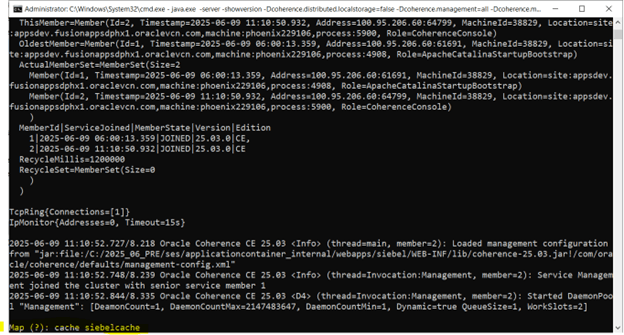
cp /<SIEBEL_ROOT>/ses/applicationcontainer_internal/webapps/siebel/WEB-INF/lib/coherence-25.03.2.jar com.tangosol.net.CacheFactoryAfter running the command, you’ll see Map(?) as shown below. Simply type
the command shown in the image: cache <cachename>.
Example: cache siebelcache.
Similarly, type help to view more available commands.
This command is supported on both Windows and Linux Coherence Server deployments.
<Siebel Installation Directory>\ses\jre\21.0\