How Siebel CRM Creates a Multi-Value Group
This figure describes the objects and properties that Siebel CRM uses to create a multi-value group (MVG) applet:
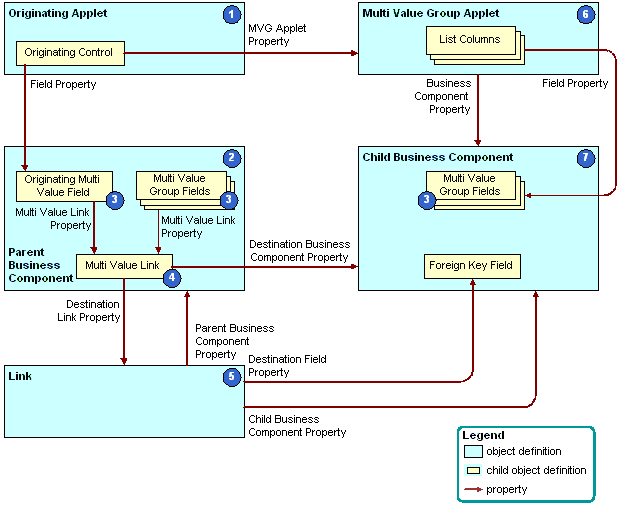
As shown in the figure, Siebel CRM uses the following objects to create a MVG applet:
- Originating applet. Contains the control or list column that calls the MVG applet. For more information, see Originating Applet of a Multi-Value Group.
- Parent business component. Supplies data to the originating applet. For more information, see Parent Business Component of a Multi-Value Group.
- Multi-value fields. Includes the fields that constitute a MVG. For
more information, see About the Multi-Value Field.
If the field is a multi-value field, then Siebel CRM ignores the Required field. In this situation, you can do one of the following:
- Use a script in Siebel Visual Basic or Siebel eScript.
- Create a calculated field that references the multi-value field, and then make the calculated field required.
- Multi-value link. Identifies the link that provides the field values from the child business component that the MVG references.
- Link. Specifies the parent-child relationship between the parent business component and the child business component that the MVG applet references. To allow the fields in the parent business component to get their values, the multi-value link references the link.
- Multi-value group applet. A dialog box that Siebel CRM displays if the user clicks the ellipsis button in the originating applet. It lists the records of the child business component that the MVG references. It allows the user to add, edit, or delete a child record.
- Child business component. Stores the child records. The records that Siebel CRM displays in the MVG applet are the records of the child business component that the MVG references. For more information, see Child Business Component of a Multi-Value Group.