Adoption Centers
Adoption Centers provide a single source of videos, training, best practices, recommendations, and curated Cloud Application features to adopt innovative feature sets. Adoption Centers aren't informational only. Use the Adoption Centers along with Success Navigator's adoption roadmaps to plan how your organization will move to adopt these critical capabilities.:
- AI Adoption Center
- Redwood Adoption Center
- Oracle Cloud EPM
- Oracle SCM
- Fusion Data Intelligence (FDI) Adoption Center
- Success Pathways
- Working efficiently with Support
Access Adoption Centers
The home page includes a few featured Adoption Centers, while all Adoption Centers are available from the Adoption Centers page.
To access Adoption Centers select Adoption Centers in the application menu.
Redwood Adoption Center
The Redwood Adoption Center is your source for adopting Oracle's innovative Redwood design system. You can access the Redwood Adoption Center from the home page or from the Adoption Centers link on the menu  .
Highlights of the Redwood Adoption Center include:
- An introductory video that provides an overview of Redwood.
- Transition to Redwood—This section's four tabs walk you through the process of adopting Redwood from beginning to end. Get product-specific details to help you understand timelines, plan your transition, enable Redwood, and extend it.
-
Explore Curated Redwood Adoption Center Features—View a consolidated list of all Redwood features. For HCM, they are sequenced by the suggested order for adopting Redwood; for other products, the order is not sequential. Each tile represents a product and shows when Redwood features will be available if not already. Select a tile to view a features list with only Redwood features for the selected product. You can understand the impact, access learning, share feature content, and add features to your roadmap from the feature list filtered by the tile.
- Resources—The Resources section provides additional information and links to Redwood blogs, training, and documentation.
AI Adoption Center
Using the information in the AI Adoption Center to adopt AI features can enhance automation, decision-making, and user experiences.
- An introductory video where you can look at AI capabilities. Transition to AI—The four tabs in this section cover how your organization can adopt AI. Get product-specific details to help you understand AI, understand AI for Fusion applications, learn how to enable AI, and see how AI can work in OCI.
- Explore Curated AI Adoption Center Features—View a consolidated list of AI-specific features for each of the product tiles. Select a tile to view a features list with only AI features for the selected product. You can understand the impact of the AI features in the list, access learning, share feature content, and add features to your roadmap.
- Resources—The Resources section provides additional information and links to Oracle AI blogs, training, and documentation.
Success Pathways Adoption Center
The Success Pathways Adoption Center brings together practical guidance to help you identify business outcomes, follow Success Steps, and use relevant Oracle AI Success Navigator capabilities across implementation, innovation, and AI adoption.
- Implementation outcomes—Guidance for starting implementation, managing risk, making design decisions, building readiness, preparing for go-live, and transitioning to operations.
- Innovation outcomes—Guidance for improving adoption and user value, preparing for quarterly updates, and planning innovation work.
- AI outcomes—Guidance for prioritizing AI process opportunities and planning AI adoption at scale.
- Success Steps—Action-oriented steps with links to the relevant Success Navigator capabilities for each outcome.
- Ask Oracle—Prompts that can help you prepare assessments, plans, and next steps for a business outcome.
Working Effectively with Support Adoption Center
The Working Effectively with Support Adoption Center is your source for guidance on engaging Oracle Support. Learn how to prepare and manage service requests, find relevant resources, track progress, escalate issues when needed, and collaborate with support teams.
- Getting started with Oracle Support—Learn how to access Oracle Support, find helpful resources, and prepare the information needed for an effective request.
- Identify the right issue type—Learn how to assess the impact, affected users, urgency, and nature of an issue.
- Create and manage Service Requests—Learn how to create complete service requests, provide supporting evidence, respond to updates, and monitor progress toward resolution.
- Request manager attention and escalations—Learn when and how to raise urgency, request manager attention, escalate service requests, and track their resolution.
- Resources—Find videos, training, and documentation to support your work with Oracle Support.
SCM Adoption Center
The SCM Adoption Center brings together guidance, curated features, and resources to support adoption of Oracle Fusion Cloud Supply Chain and Manufacturing.
- Adopt Oracle SCM: Access guidance for adopting Redwood and AI capabilities in SCM, and stay connected to SCM events, announcements, forums, and discussions.
- Explore Curated Oracle SCM Features: Browse product-specific curated features across SCM, including inventory management, supply planning, procurement, manufacturing, order management, and warehouse management.
- Resources: Find training and enablement content, blogs, documentation and knowledge-base content, and success stories.
Oracle Cloud EPM Adoption Center
The Oracle Cloud EPM Adoption Center brings together practical enablement content to help teams improve financial and operational performance management with Oracle Cloud EPM and AI.
- Guidance to streamline close.
- Guidance to automate reconciliations and reporting.
- Guidance to connect planning across finance and operations.
- Guidance to establish an EPM Center of Excellence, including change management and RACI best practices.
- Resources to help reduce total cost of ownership, accelerate implementations, and improve audit and compliance readiness.
- AI-driven insights and prebuilt dashboards, reports, and tutorials to support better decisions.
Fusion Data Intelligence (FDI) Adoption Center
The FDI Adoption Center provides a simple adoption path to help implementers and users get started, build expertise, and stay current with product enhancements.
- Training, videos, self-paced learning paths, and certification resources.
- Onboarding guidance to align stakeholders, define ownership, and prepare for rollout.
- Implementation guidance for planning, setup, dependencies, and readiness checkpoints.
- Go-live resources for cutover planning, launch communications, support coverage, and early monitoring.
- Adoption guidance to monitor engagement, reinforce effective practices, and improve the rollout experience over time.
- Oracle Help Center resources, community connections, and office hours for ongoing learning and support.
Working with Features in Adoption Centers
Each Adoption Center includes a curated list of features that, when implemented, will help you adopt the related capabilities. The features are found in the Explore Curated Adoption Center Features section.
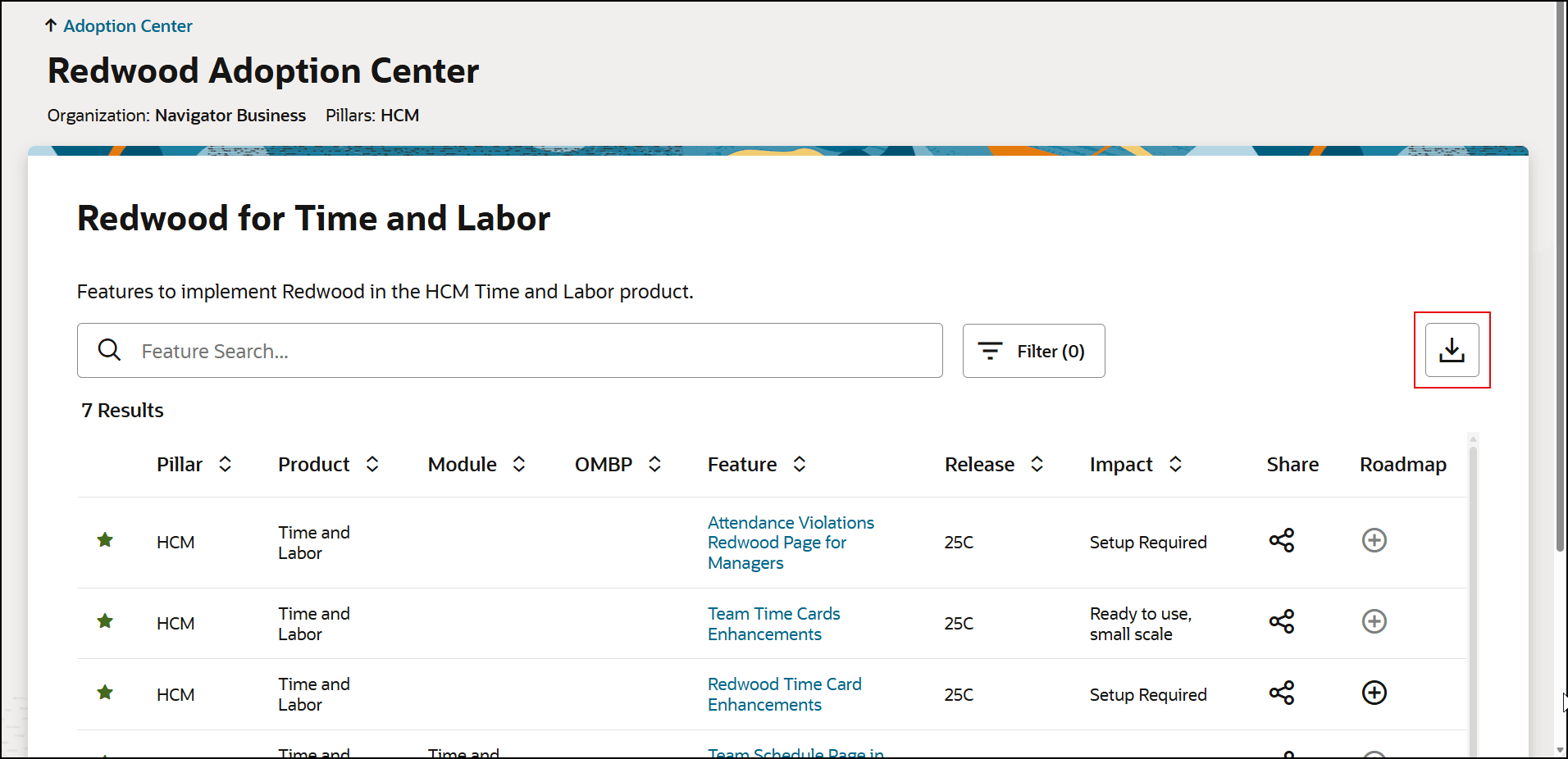
Each card in that section represents a group of features. After you select the card, you'll find a list of features. You can then add those features to your adoption roadmap (see Assess and Adopt Features and Adoption Roadmaps) or export the list to Excel.
Exporting Features
- Go an Adoption Center page.
- Navigate to the Explore Curated Adoption Center Features section.
- Use the tabs to find features by pillar and product.
- Select the feature group card that you're interested in.
- On the feature list page, select the Export button.
Note:
- The exported Excel file includes all currently visible (filtered) features and uses the same columns and order as the Feature Innovation page export.
- The file name will include the theme feature name and a timestamp.
- If filters are applied, only features displayed on the page will be included in the export.