Learn about Business Processes
Use Learn about Business Processes to explore the business processes available in Oracle Cloud Applications and find resources to help you understand them. These processes also provide the foundation for the predefined configurations and use cases available in Starter Configuration.
- Explore to browse the business process hierarchy from Level 0 (L0) through Level 3 (L3).
- Learn to access the videos, use cases, leading practices, and KPI reports available for those processes.
Access Learn About Business Processes
- Application menu: Expand Implement, and then select Business Processes.
- Home page: In the Implement section, select Learn about Business Processes.
- Journey: Open the related business process learning link in your journey.
The page opens in the Explore view.
Understand the Business Process Hierarchy
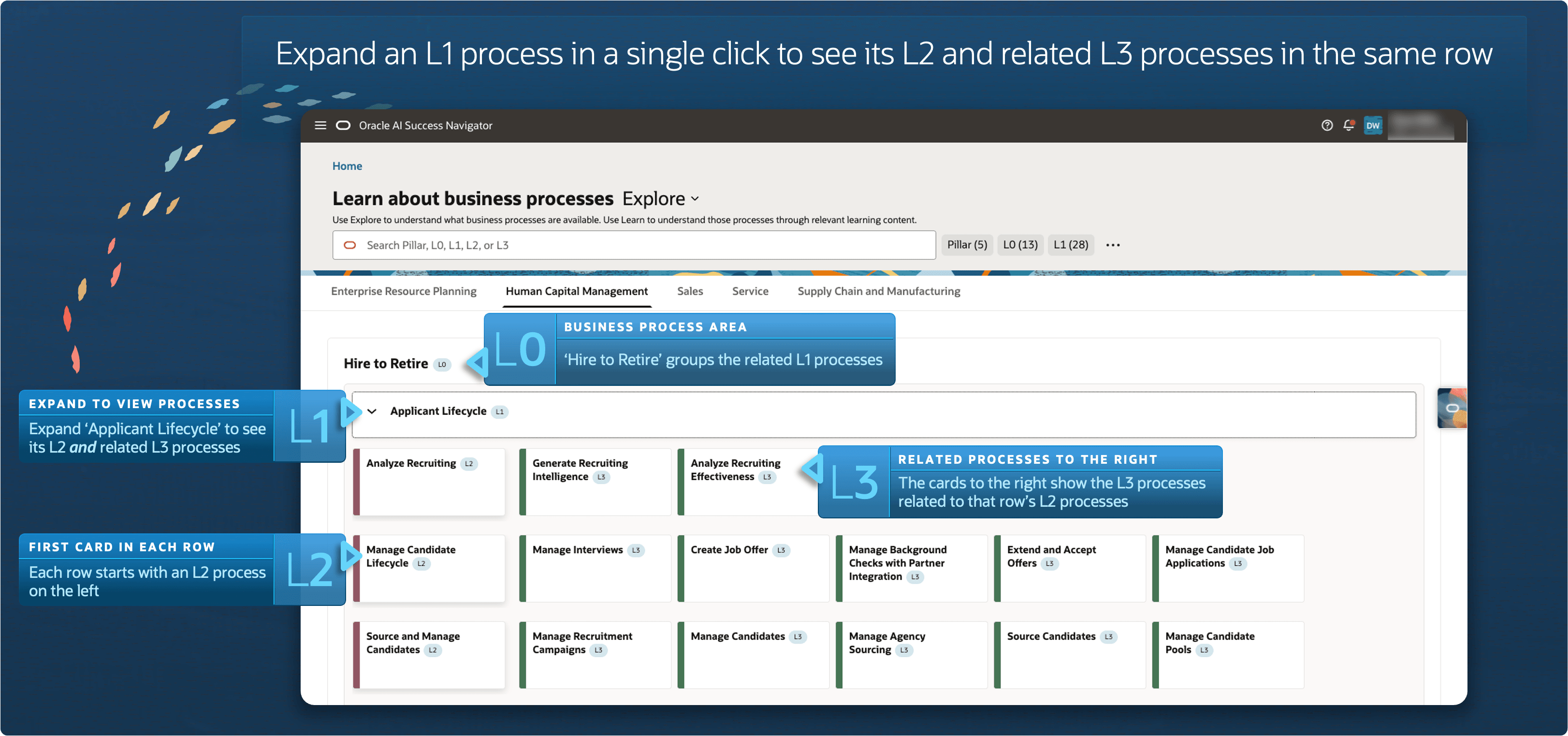
The Explore view organizes business processes into four levels, from broad process areas to more detailed processes.
| Level | Example | How it Appears |
|---|---|---|
| L0 | Hire to Retire | Contains the related L1 processes. |
| L1 | Applicant Lifecycle | Expands to show L2 processes and their related L3 processes. |
| L2 | Analyze Recruiting | Appears at the start of a row. |
| L3 | Generate Recruiting Intelligence; Analyze Recruiting Effectiveness | Appears to the right of its related L2 process. |
Each process has a pill identifying its level. L3 is the lowest level displayed in the Explore view.
Example Business Process Hierarchy, L0 Through L3
Search and Filter Business Processes
- Search: Enter a pillar or process name, or a keyword such as interviews, to narrow the hierarchy across levels L0 through L3.
- Filters: Use the available filters to narrow the processes displayed.
- Pillar tabs: Select a pillar to browse its business processes.
In Explore, use these controls to locate processes in the hierarchy. In Learn, use them to find processes and access their available learning resources.
If no results appear, try a shorter keyword or adjust your filters. Clear the search text to remove the text filter.
Explore Business Processes
- Open Learn about Business Processes. If necessary, select Explore from the view selector next to the page title.
- Select a pillar tab to browse its business processes.
- To narrow the results, enter a pillar or process name in the search field, or use the available filters.
- Find the L0 process area you want to explore, and expand an L1 process within it.
- Review the L2 processes and their related L3 processes. Each row starts with an L2 process and displays its related L3 processes to the right.
Find Learning Content
- Select Learn from the view selector next to the page title.
- Select a pillar tab. Use search or filters to narrow the processes displayed.
- Find the L0 process area, and expand an L1 process to see its L2 and L3 processes.
- Select an available resource link:
Resource What You Can Do Video Watch a video about the selected process. Use cases Browse scenarios for the selected process. Select a use case to view its video and download its Step Guide, where available. Leading practices Review recommendations for the selected process. KPI Reports Review the KPIs, analyses, dashboards, and reports associated with an L1 process. This link appears on the L1 process heading.
The available resources vary by process.
The selected resource opens in a side panel that identifies the process and its level. You can expand the panel for a larger view or close it to return to the hierarchy.