26 Agent Operations
This section covers other essential agent operations, like moving, copying, or deleting AI agents.
Move an Agent
You can move agents you own or have MANAGE permissions for.
- On the Home page, navigate to the folder that contains the agent you want to move.
- Next to the agent you want to modify, click
 Actions and click Move .
 - Select the new workspace location for the agent. Click Move.
Copy an Agent
You can copy an agent you own or have MANAGE permissions for to another location an available workspace.
You can copy agents to the same or different folder. Agents can be copied to folders in different workspaces to which you have access. The agent configuration, as well as tool and guardrail settings, are copied. AI compute cluster attachments are not copied and you need to attach the agent to a new AI compute cluster to resume development.
- On the Home page, navigate to the folder that contains the agent you want to move.
- Next to the agent you want to modify, click Actions and click Copy to workspace.
- Provide a new name and description for the copied agent, if necessary.
- Click Browse and select a new location in the workspace to copy the agent to. Click Select.
- Click Copy.
Download Agent Files
You can download agent files and their guardrail files that contain the definitions for that agent.
Agent files are JSON files with the file extension AFLOW and contain the definitions for your agent. Guardrails files are labeled
_guardrails.JSON and contain the guardrail definitions for the agent.
- Click the name of the agent you want to download.
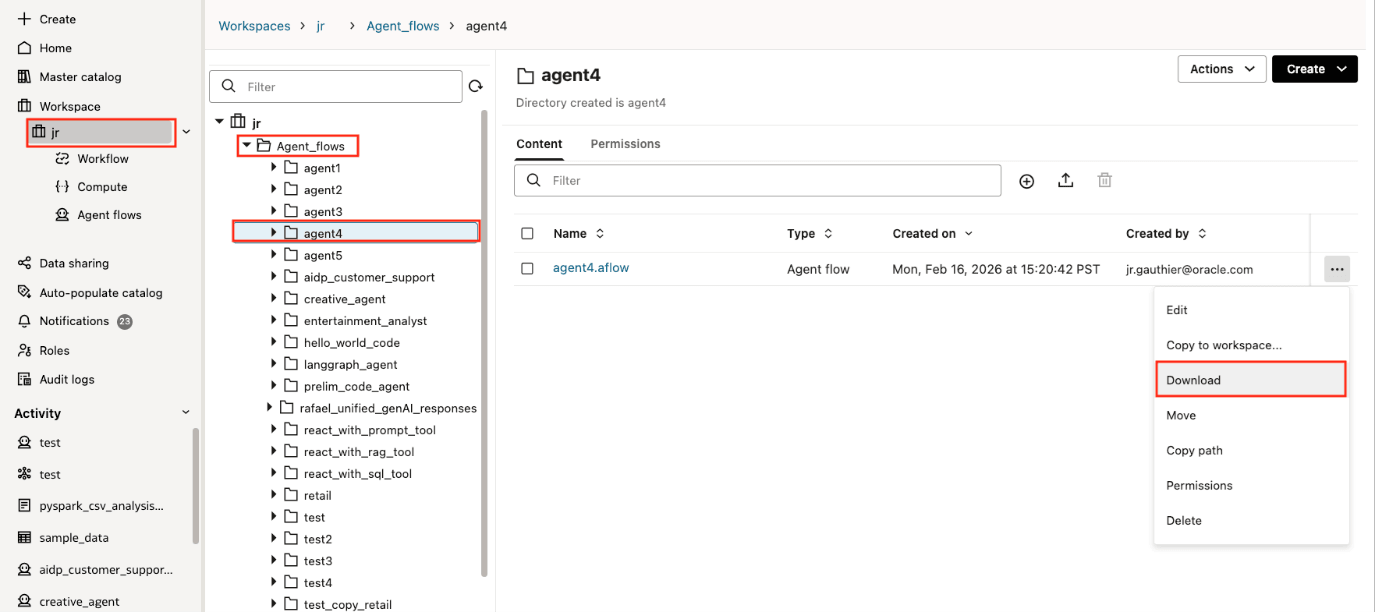
- Next to the AFLOW file for your agent, click Actions then click Download. The file is downloaded to your local machine.
- Next to the
_guardrails.JSONfile, click Actions then click Download. The file is downloaded to your local machine.