Change Ownership of Content in a User's Private Folder

You can transfer ownership of content that users save in private folders. For example, if an employee leaves your organization, you might move their private workbooks and machine learning models from the \User Folders\<User>\ folder to a different folder so that other users can edit and deploy them.

  1. In Console, change the ownership of the private objects to the administrator:
    1. On your home page, click Navigator Navigator icon used to display the Navigator, then click Console.
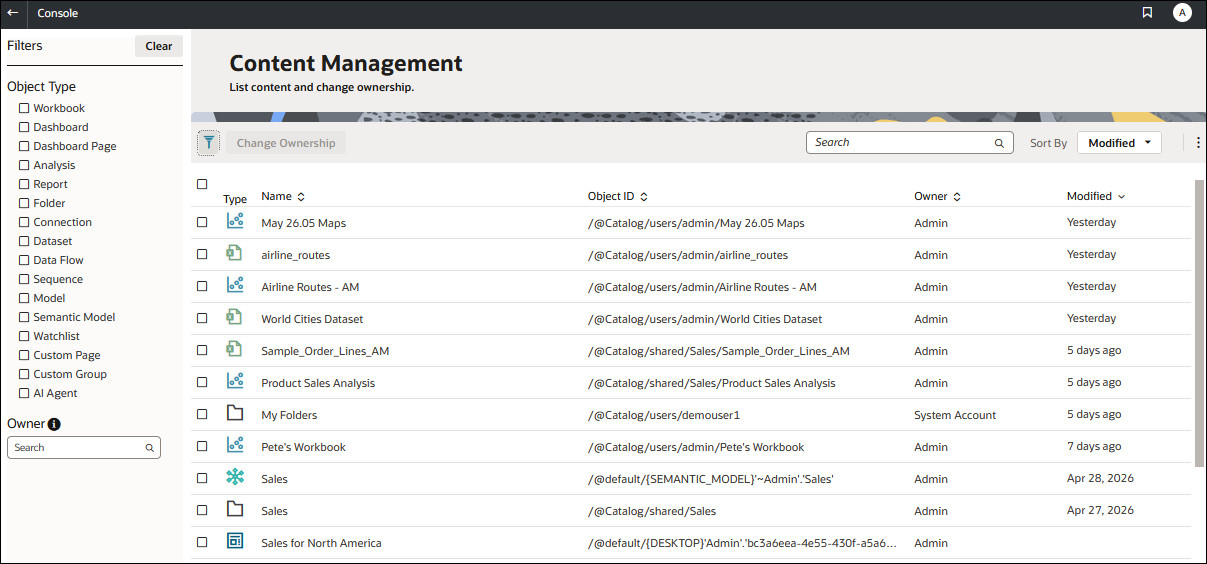
    2. Click Content Management.

      Content Management main screen

    3. Click Filters, and then enter the name of the user in the Owner field.
      You see all content owned by that user. Private objects are prefixed with /@Catalog/users/<username>/ in the Object ID). For example, private content owned by someone with the username "john.smith" is prefixed with /@Catalog/users/john.smith/.
    4. Select one or more private objects owned by the user.
    5. Click Change Ownership to display the Change Ownership dialog.
    6. Under Change ownership to, click Users, and enter your username or Admin, then click OK.
  2. In the Catalog, change the permissions for the private objects and move them to a new folder:
    1. Click Navigator, then click Home, and from the Page Menu select Open Classic Home.
    2. Click Catalog, then click Admin View in the top left-hand corner.
    3. Under User Folders, click My Folders, then select the user's private folder.
    4. In the Tasks panel, click Permissions, and assign control of the folder and its contents to the a different user.
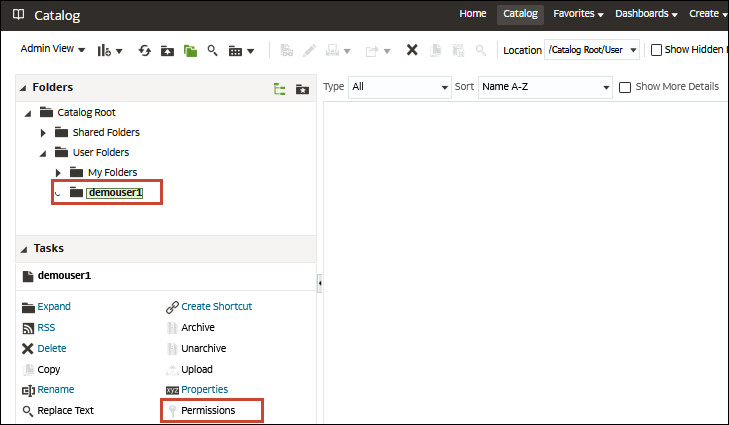
      Catalog page in Oracle Analytics Cloud Classic

    5. Move the content from the user's private folder to a different folder that other users can access.
      In the source folder, select the objects you want to move, then click Copy. Then, in the target folder, click Paste.
      For example, you might move workbooks and machine learning models from the \User Folders\USER1\ to \User Folders\USER2\, or to a shared folder that multiple users can access.