Control Access to Oracle Analytics AI Agents
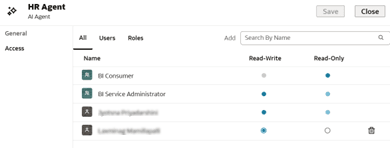
Authors can manage its agent access permissions by assigning read-only or read-write privileges to users and roles.
You must save the agent in a shared folder and grant appropriate privileges to the agent.
- On your home page, click Navigator
 , and then click Catalog.
 - Locate the agent you wish to modify permissions for, click Actions, and click Move to.
- Navigate to the appropriate shared folder and click OK.
- Navigate to the shared folder you just saved the agent, click Actions, and click Inspect.
- Navigate to the shared folder you just saved the agent, hover over the agent, click Actions, and click Inspect.
- Click Access.
- To share the agent with a user not already listed, click Users, then type the user's name into the Add field.
- In the Users tab, set Read-Write or Read-Only permissions for each user as appropriate. Click Save.