Manage Shared Images
Content authors can create shared images so anyone can use the image in any workbook.
As an administrator, you can view and manage all the images that content
authors have shared in the Console. You can:
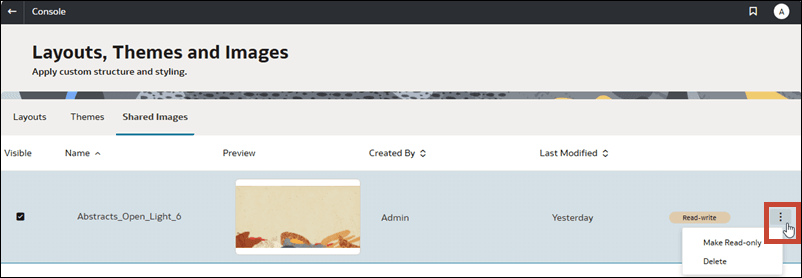
- Show or hide shared images: Select the Visible checkbox to make the image available for authors to select when adding an image to a workbook using the Shared Image option. Deselect Visible to hide the image from authors.
- Allow or prevent image deletion: Select the Make Read-only option to stop anyone from deleting the image. Select Make Read-write to allow the image to be deleted.
- Delete images: Click Delete to permanently remove the image from shared storage and all the workbooks where the image is currently used.
The size limit for an individual shared image is 10MB. The overall limit for all shared images in cloud storage is 50GB. You can store up to 250 shared images in your Oracle Analytics Cloud.
- On your Oracle Analytics home page, click Navigator
 , and then click Console.
 - Click Layout, Themes and Images, and then click the Shared Images tab.
- Click Images, and select or deselect Visible to show or hide the shared image from authors.
- Click the menu for an image and select an option.