About Lineage in a Semantic Model
Use the lineage view to see how a semantic model's tables and columns map across its physical, logical, and presentation layers. This view can help you identify the physical sources associated with a logical table, or see which presentation objects are associated with the logical table.
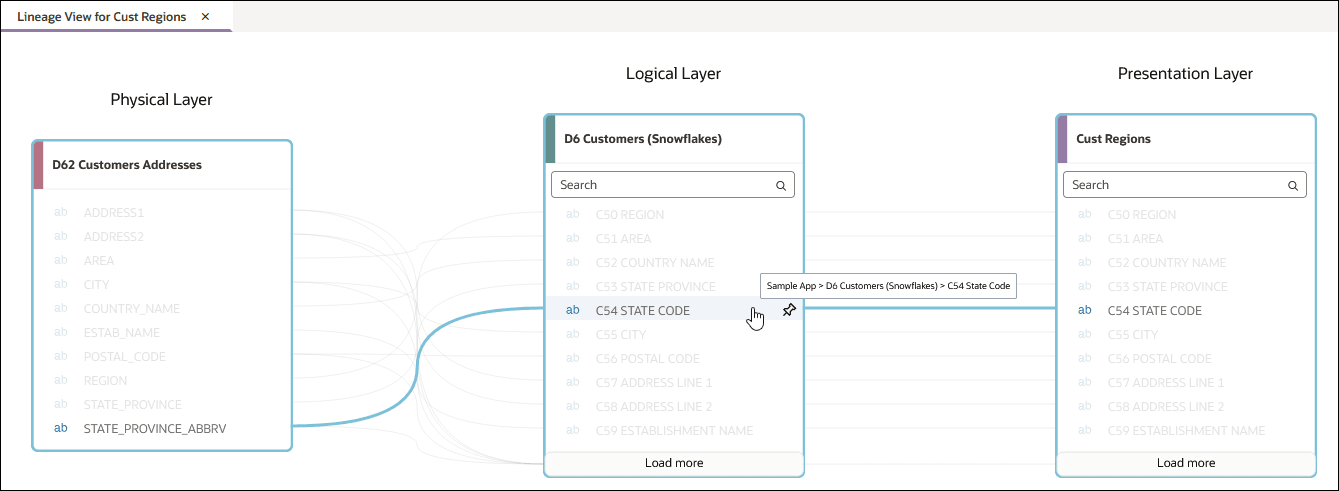
The lineage view displays related tables in three columns where each column represents a layer of the semantic model. Lines between the column's show how the mapped objects connect across the layers. You can expand the tables in the view to see their columns. When you hover over a column, the view highlights its connections to columns in the other layers.
For example, the lineage view for the presentation table Cust Regions shows its connection to the logical table D6 Customers (Snowflakes) and the physical table D62 Customers Addresses. When you hover over C54 STATE CODE in the logical table, the view highlights its connection to STATE_PROVINCE_ABBRV in the physical table and C54 STATE CODE in the presentation table.
You can open a lineage view from a table in the physical, logical, or presentation layer. From a table in the lineage view, you can also open an available physical or logical diagram to examine the table alone or with tables that have direct joins to it.
See Display a Table's Lineage and Open a Diagram from a Lineage View.