Configure a Client That Requires a Client Secret
Connect your AI client directly to the Oracle Analytics Cloud MCP server using OAuth 2.0 authentication with a client secret.
This connection requires a confidential application in Oracle Identity and Access Management (IAM). Work with your IAM administrator to obtain the application's client ID and client secret, and the OAuth scope if required by the AI client. Use these values to configure the client's connection.
A direct connection doesn't require
oac-mcp-connect. The configuration fields and steps vary by AI client.
For more information about adding Oracle Analytics Cloud safe domains, see Register Safe Domains.
- Obtain the OAuth redirect URL provided by your AI client.
- Work with your IAM administrator to configure a confidential application for the connection. Provide the AI client's redirect URL and obtain the application's client ID and client secret.
- On your Oracle
Analytics Cloud home page, click your user icon and then click Profile.
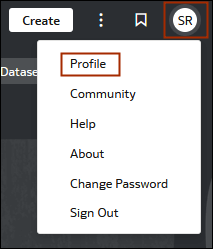
- In your user profile dialog, click MCP.
- Copy the endpoint URL for the connection you want to configure:
- To use data and catalog tools, go to Oracle Analytics MCP and click Copy URL.
- In your AI client, create a remote MCP connection and configure OAuth authentication.
- Enter the copied MCP endpoint URL into the client's server URL field.
- Enter the confidential application's client ID and client secret in the corresponding OAuth fields.
- If the client requires additional OAuth settings, obtain the values from your IAM administrator.
- Work with your IAM administrator to add the AI client's redirect URL to the redirect URLs configured for the IAM confidential application.
- Complete the connection setup in the AI client and sign in to Oracle Analytics Cloud when prompted.