Apply Generative AI in Data Preparation in Oracle Analytics
Use the dataset editor to apply generative AI to your data in Oracle Analytics. For example, you might might classify reviews as positive, negative, or neutral, or generate summaries of customer feedback comments.
For information about limitations with using AI Functions, see Known Issues with AI Functions.
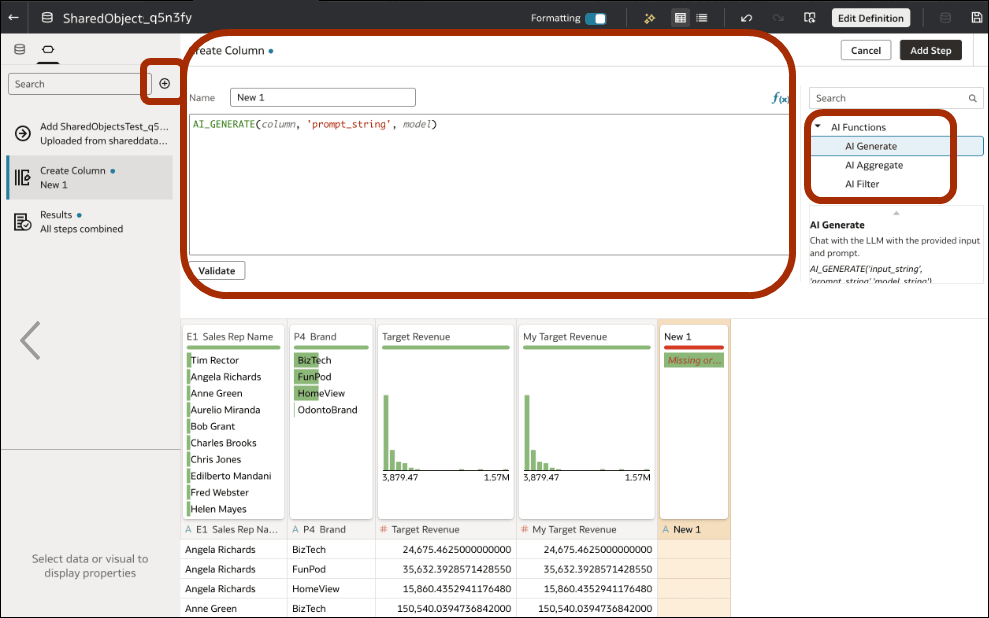
- To generate text, or apply a semantic filter, click Add Preparation Step in the Data Panel to add a column and select AI Generate or AI Filter from the function picker.For example:
AI_GENERATE(  'Text: ' || TICKET_TEXT,  'Return a standardized category: Billing, Technical, Account, or Other. Return only the
      category.',  'model'.'id' )
For example:CASE WHEN AI_FILTER( 'Is this ticket about billing or payment?', 'Ticket: ' || TICKET_TEXT, 'model'.'id' ) THEN 'Y' ELSE 'N' ENDSee AI Functions.Note:
If the dropdown for themodelargument doesn't show the model you want to use, check that your model is registered in the Shared Folders area in the catalog, and that the model owner has granted you Read-Only or higher permissions. See Make a Generative AI Model Available in Oracle Analytics.
After you finish authoring content, either you (if you have Full Control of the model) or the Generative AI model owner must grant intended 'readers' at least Read-Only permission to access the content.