Create Column Prompts

A prompt enables you to filter the data that you see. A column prompt enables users viewing a dashboard to select a value for a column that affects what they see on the dashboard.

Use the following procedure to create:

  • A named column prompt that you can apply to one or more dashboards.
  • An inline column prompt that is embedded in an analysis. For example, you can add a prompt to the Brand Revenue analysis so that the analysis can be reviewed for specific brands. You add a prompt directly to a column in the analysis (an inline prompt).
  1. Open the analysis for editing.
  2. On the Definition pane of the Prompts tab, click New to access the prompt type selection list. Select Column Prompt and select the appropriate column.
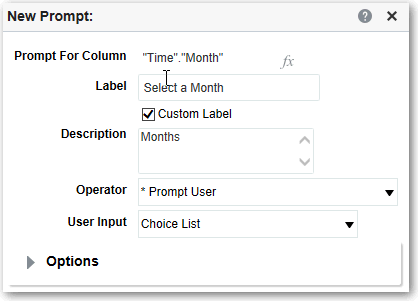
  3. Click Custom Label and enter a caption for the column filter prompt. The caption displays as the field label for the prompt.

    For example, "Select a currency."

  4. In the Description field, enter a short description for the prompt.

    This description becomes tooltip text, which is displayed when the user hovers the mouse pointer over the prompt's label in the dashboard or analysis.

  5. From the Operator list, select the operator to use, such as "is greater than." If you want the user to select the operator at runtime, then select the *Prompt User operator.

    If you’re creating a prompt that includes a group in the prompt's value selection list, then you must set the Operator to either is equal to/is in or is not equal to/is not in. See About Groups and Calculated Items.

  6. In the User Input field, select how you want the prompt interface to ask the user for input. For example, prompt the user with a radio button to select only one prompt value.
  7. Depending on the type of user input that you specified, enter the appropriate values in the User Input field.

    For example, select Custom Values to indicate that users can select from a list of prompt values that you created rather than the values supplied by the column.

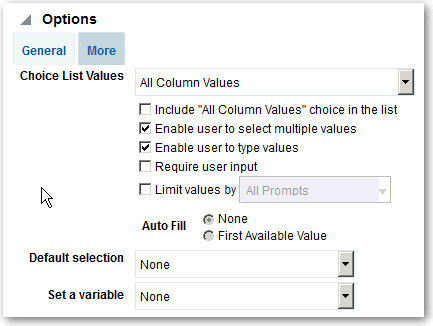
  8. Within the Options section, select prompt options to specify the display of list values and user interaction with the prompt. The prompt options vary depending on the user input type and list values type that you selected.
  9. In the Default selection field, select the prompt value or values that users see initially.

    If you select a default type, then a field is displayed where you can either select specific values, or specify how you want the default values to be determined. For example, if you select SQL Results, you must then supply a SQL statement to generate the list of values.

  10. Click OK.
  11. Click Save Prompt in the editor or save the analysis.
  12. Use the arrow buttons in the Definition pane to reorder the selected prompt. Reordering the prompts controls the order in which the choices are displayed to users at runtime.
  13. Select the type of layout you want on the prompts page by clicking New Row or New Column in the Definition pane.

    A row-based layout saves space because it organizes prompts horizontally. A column-based layout aligns prompts into neat columns. Click the boxes in the New Column or New Row column in the Definition table that correspond to where you want to add a new column or row to the prompts page.

  14. Preview the prompt with sample data using the Display pane, or click Preview (if available) in the Definition pane toolbar to view the prompt with actual prompt values.