Create a Featured Prompt for an AIDP Deep Insights Agent
Create a reusable analytical request that consumers can select and run using an AIDP Deep Insights agent.
Before creating the prompt, identify the analysis you want consumers to perform and the results they need. Your instructions can specify data preparation, calculations, and the format of the response. For more information, see About Featured Prompts for AIDP Deep Insights Agents.
You need the Create and Edit Deep Insights Agents permission to create featured prompts. For more information see About Permissions for AIDP Deep Insights Agents.
It's important to test your prompt and review the findings to verify that the prompt produces the intended analysis and response format. See Use a Featured Prompt. You can modify your prompt at any time, see Modify an Oracle Analytics AI Agent.
- On your home page, hover over the AIDP Deep Insights agent you want to create a prompt for, click Actions, and then click Open.
- Click Edit.
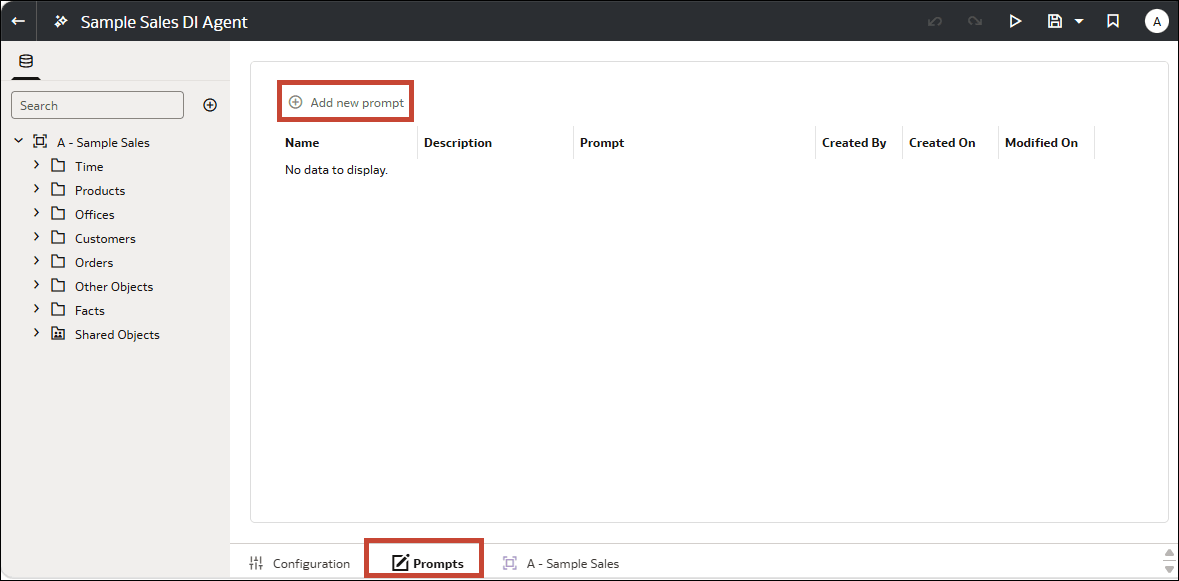
- Click the Prompts tab.
- Click Add new prompt.
- Enter a Name and Description that explain the purpose of the analysis so consumers understand what the prompt is for.
- In Prompt, enter the instructions.
- In Model Selection, select the model configuration for the prompt.
- Click Save, then click Close.
- Save the agent.