FAQs Export Items in DVA Format
This topic provides answers to frequently asked questions (FAQs) about exporting analytics content in DVA format. Oracle Analytics uses the DVA format to import and export analytics items and their related items. For example, if you export a data flow in DVA format, you can include input and output datasets in the export file.
What items can I export as a DVA?
- Workbooks
- Data flows
- Sequences
- Folders
A folder can only be exported if it contains a workbook anywhere in the folder hierarchy. When exporting a folder, all artifacts regardless of type are exported.
How are dependent items determined when exporting a DVA?
- Workbooks
- File based and connection based Datasets (not Subject Areas)
- Connections
- Data flows
- Sequences
For example if you create a DVA from a workbook, depending on the options selected when exporting, the DVA will contain the workbook and the datasets referenced in the workbook. If any of these datasets were created via a data flow then it will also include that dataflow and possibly more datasets.
- Exporting a Dataflow - DVA will contain the dataflow and all input and output datasets. Other dependencies on these any of these artifacts will also be included.
- Exporting a Workbook - DVA will contain the workbook add the datasets used in the workbook. Other dependencies on these any of these artifacts will also be included.
- Exporting a Workbook (with a dataset that is the output of a data flow) - DVA will contain the workbook add the datasets used in the workbook along with the data flow that created the output dataset. Other dependencies on these any of these artifacts will also be included.
- Exporting a Sequence - DVA will contain the sequence and all the datasets, sequences, and data flows contained in the sequence. Other dependencies on these any of these artifacts will also be included.
I imported a DVA from the home page, where did the items in the DVA go?
When a DVA file is imported from the home page or any page where a catalog path cannot be determined, these items are imported to the user /My Folders directory. If you access the catalog, select a folder, then import, all the items in the DVA will be in the selected folder.
When I was importing my DVA I received the following message "filename.dva contains content with the same name as existing content. Do you want to continue and replace the existing content?". What does this mean?
This means that the DVA file contains items that already exist in the location where you are importing and if you continue those items will we overwritten. If they are overwritten the object IDs of the target items are retained. If you do not wish to replace these items the DVA can be imported into a new folder and all items from that DVA will be contained within a single folder.
What items can I optionally include when I export a DVA?
When creating a DVA import there are few options that allow to use to control what is being exported. Of the options there is only one that will control what items are included, "Include Data". This option will include any file based or connection based datasets, connections and their dependencies. There is no way to control the items exported it at a finer grain.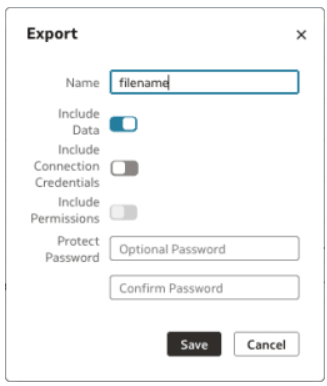
Description of the illustration one-catalog-1.png
Note: When an export contains a connection, if the Connection Credentials are included, the credential (normally password) is included, but in the case of a connection to ADW, the wallet is not included.
What is an object ID and how do they impact DVA imports?
When importing content with a DVA it is important to understand object ID and how they are treated on import. An object ID is a two-part string consisting of a prefix string, a period (to delineate the two parts), and an object name. e.g. '<guid>.dataset1'. The object ID prefix is a GUID (Globally Unique Identifier) so when importing a DVA the target system will generate new GUIDs for each of the items like datasets that require them. Any other items imported in the same DVA will have their references updated so they point to the new object ID. Object IDs is no non-deterministic, and in the case of an overwrite the object ID of target items will be retained.
- If the target environment already contains an object with the object ID 'user2.dataset' this will be overwritten by the object being imported. If the target environment contains an object with object ID 'user1.dataset' this object will remain unchanged. This is a common cause for multiple copies of datasets and connections inadvertently being created.
- When moving items to a target environment using DVA export/import, if user who originally created the objects also performs the import, the object IDs do not change and the import behaves intuitively. When different users create the object that have object IDs, or a different user (not the object creator) imports a DVA, undesirable consequences can be experienced.
What if import the same DVA into two different folders?
In this case you will have duplicate versions of all the same items. The duplicate items will have different object IDs.
Do I have to import a DVA into a folder?
Yes, all DVA imports target a folder.
I want to point existing item to a new item I just imported, how can this be done?
The newly imported item will have a new object ID and it may become necessary to create aliases for old IDs. For example, let's say you have a workbook that references the dataset 'username'.'MyDataset'. If at some point MyDataset is deleted or lost in migration, it is a common practice to recreate the dataset with the same name so that the workbook will use it again. However, when you recreate the dataset, it will get a new globally unique ID like 'b5ea442f-cb70-4dfa-8d34-2bf6d8c3313d'.'MyDataset'. The old reference ID in the workbook will not find this new dataset and it will be broken. To fix this, you can create an alias for the old object ID in your new dataset. Add an alias 'username'.'MyDataset', and now the dataset can be found by that ID in addition to its new globally unique ID. The workbook will work again.
To create an alias, open the inspect dialog for the item, go to the Aliases tab, and add your old object ID there. You can add more than one alias if necessary. And you can delete aliases that are no longer necessary.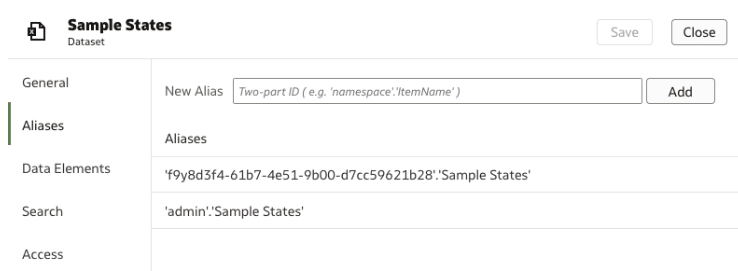
Description of the illustration one-catalog-2.png