Hide the Workbook Header Navigation Button in Present
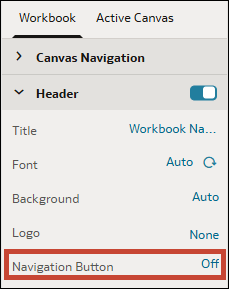
When you design a presentation flow, the Go back button in the workbook's header bar displays by default. You can choose to hide it so consumers can't access it.
If your consumers land directly in a workbook when they open Oracle Analytics, you can hide the Go back button  for the workbook so they can't navigate to the home page or the catalog.
- On your home page, hover over a workbook, click Actions, and select Open.
- Click Present.
- In the Present page, click the Workbook tab.
- In the Header section, in the Navigation Button row, click On to turn it to Off.
- Click Save.