Modify the Workbook Header Color
When you configure the presentation settings for a workbook, you can customize the workbook header background's color and transparency for consumers.
- On your home page, hover over a workbook, click Actions, and select Open.
- From the Preview menu
 , select Configure Presentation.
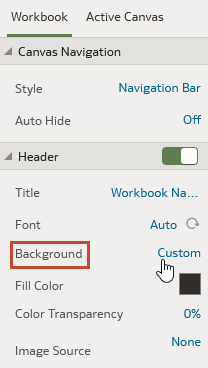
 - In the presentation settings panel, click the Workbook tab.
- In the Header section, click the Background field and select Custom.
- In the Header section, use the Fill Color and Color Transparency fields to specify how you want the header's background to display.
- Click Save.