Modify the Workbook Header Title
When you configure the presentation settings for a workbook, you can specify which name you want to display as the workbook's header for consumers, and how you want to format the header text.
The workbook header title options are:
- Canvas Name: Displays the current canvas' name and changes as the consumer selects canvases.
- Workbook Name: Displays the workbook name.
- Workbook Name and Canvas Name: Displays the workbook name and the current canvas name.
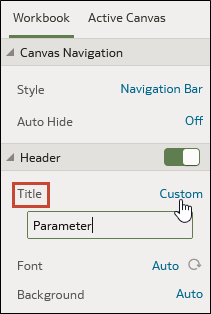
- Custom: Displays the custom name you specify.
You can also add an image to the workbook header. See Add an Image to the Workbook Header.
- On your home page, hover over a workbook, click Actions, and select Open.
- From the Preview menu
 , select Configure Presentation.
 - In the presentation settings panel, click the Workbook tab.
- In the Header section, click the Title
field and select the name you want to use as a title, or
select Custom and enter a title.
- Optional: Click the Font field and specify the font style, font size, and any formatting that you want to use in the title, for example, bold or italic.
- Click Save.