Show or Hide the Workbook Header Bar
When you configure the presentation settings for a workbook, the workbook's header bar is set to display for consumers by default. You can choose to show or hide the header bar.
The header bar displays the workbook title that you specify. For
example, canvas name, workbook name, or a custom name.
- On your home page, hover over a workbook, click Actions, and select Open.
- From the Preview menu
 , select Configure Presentation.
 - In the presentation settings panel, click the Workbook tab.
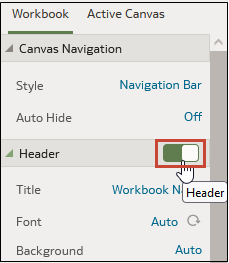
- In the Header section, click Header to toggle it to
Off to hide the header bar, or click it to toggle it
to On to show the header bar.
- Click Save.