Override a Selection Step with a Prompt

You can override a selection step with either a dashboard prompt or an inline prompt.

For example, you can specify that the Products.Brand selection step be overridden with a column prompt specifying the BizTech and FunPod members.

  1. Open the analysis for editing.
  2. In Results tab, select the columns for the analysis and then navigate to the Selection Steps pane by selecting Show/Hide Selection Steps Pane.
  3. Specify the selection steps for the analysis.
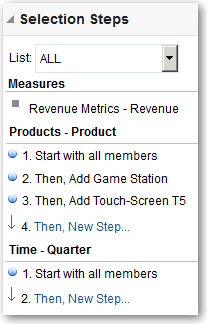
  4. Determine which selection step you want to override with a column prompt and click Edit.
  5. In the dialog, select Override with prompt, if it’s available for that type of step.
  6. Click OK and save the analysis.