
 Create a Python Application Using the Caching REST API
 Before You Begin
This tutorial shows you how to deploy a simple REST application in Python that implements the caching feature of Oracle Application Container Cloud Service. This tutorial takes approximately 10 to complete.
Background
Oracle Application Container Cloud Service lets you deploy Go, Java Platform, Standard Edition (Java SE), Node.js, PHP, Python, Ruby, and Enterprise Edition (Java EE) applications to Oracle Cloud.
The new caching capability of Oracle Application Container Cloud Service allows applications to accelerate access to data, share data among applications, and offload state management.
What Do You Need?
- Access to an instance of Oracle Application Container Cloud Service (Make a note of your account information: identity domain, user name, and password.)
- Python 3.6+
- The pip package management system
- Python Employee application project python-cache-app.zip
- cURL 7.0+ with SSL support
 Create an Application Cache
- In a web browser, go to https://cloud.oracle.com/home and click Sign In.
- From the Cloud Account menu, select Traditional Cloud Account, select your data center, and click My Services.
- Enter your identity domain and click Go.
- Enter your cloud account credentials and click Sign In.
- In the Oracle Cloud My Services dashboard, click Action
 and select Oracle Application Container Cloud Service.
 - Click Menu and select Application Cache.
- Click Create Service.
- In the Service Name field enter
MyCacheApp, keep the default values, and then click Next: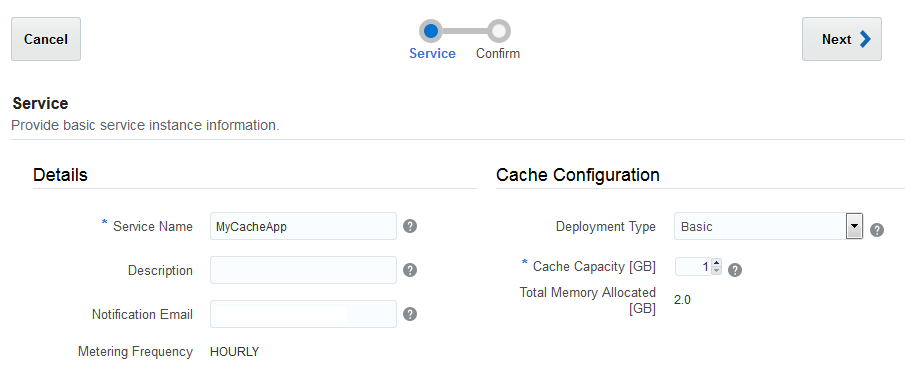
Description of the illustration cache_application.png - In the Confirmation page, click Create.
 Prepare the Application for Cloud Deployment
- Extract the contents of the
python-cache-app.zipfile in your local system. - Open a command-line window and go to the
python-cache-appdirectory. - Download the project dependencies.
pip install -r requirements.txt -t modules - In the
python-cachedirectory, create themanifest.jsonfile and add the following content:{ "runtime": { "majorVersion": "3.6.0" }, "command": "sh ./start.sh", "isClustered": true, "release": { "version": "1.0" }, "notes": "Python App using Cache REST API" } - Create the
python-cache-app-dist.zipfile with the content of thepython-cache-appdirectory.
 Deploy the Application to Oracle Application Container Cloud
- Open the Oracle Application Container Cloud Service console.
- In the Applications list view, click Create Application.
- In the Create Application dialog box, click Python.
- In the Application section, enter
EmployeeServicefor the name of your application. Click Browse next to Archive. - In the File Upload dialog box, select
python-cache-app-dist.zipand click Open. - In the Application Cache field select MyCacheApp.
- Keep the default values in the Topology
section and click Create. Processing takes a few minutes.
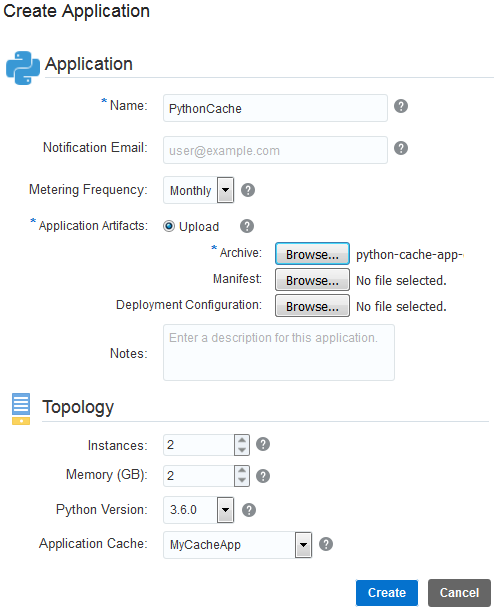
Description of the illustration create_application.png - When the application is created copy the URL.
 Testing the Application
- Open a command-line window (or a terminal in Linux).
- Put an employee object in cache. Replace the
app_endpointplaceholder with the URL of your application.curl -i -X PUT -H "Content-Type:application/json" -d "{\"id\":100,\"firstName\":\"Daniel\",\"lastName\":\"Branch\",\"email\":\"daniel.branch@example.com\",\"phone\":\"111111111\",\"birthDate\":\"1975-05-14\",\"title\":\"Developer Manager\",\"department\":\"IT\"}" app_endpoint/employees/100 - Get the employee from cache.
curl app_endpoint/employees/100 - Remove the employee from cache.
curl -i -X DELETE app_endpoint/employees/100
 Want to Learn More?
- Oracle Application Container Cloud Service: Get Started in the Oracle Help Center
- REST API for Using Caches in Applications in the Oracle Help Center