Adapters and Connectivity

Connect everything, everywhere, with adapters. An adapter simplifies connectivity, so you can design an integration that connects to an application's REST APIs without having detailed knowledge of the APIs.


Fulfill Your Business Goals

Goal Details How adapters and connectivity help

Streamline connectivity

You need to easily connect diverse applications and resources, no matter where they're located.

Adapters and the connectivity features let you connect everything easily and efficiently:

  • Applications in the Oracle cloud, including Oracle Cloud ERP, Oracle Cloud HCM, and other Fusion Applications.

  • Applications in third-party clouds

  • Applications in multi-cloud environments

  • Applications and resources in a virtual cloud network (VCN) within the Oracle Cloud

  • OCI AI services

  • Applications in your on-premises cloud

Reduce complexity

You need to interact with an application's business objects and resources, but the application's APIs can be overwhelming.

Adapters simplify connectivity, allowing you to interact with APIs without having to understand their complexity.

Work with customizations

If you've customized an application, you need to be able to work with these customizations, such as additional fields, tables, APIs, or business logic.

Adapters support end point customizations, allowing you access to the full breadth of functionality in your applications.


Adapter and Connectivity Essentials

Area More information

Definition

An adapter is the connector that an integration uses to connect to an application’s APIs.

An adapter simplifies connectivity. You don’t need to understand an API’s connection or security requirements. Instead, simply select your requirements from the drop-downs in the adapter’s wizard in Oracle Integration.

You have the following options for adapters:

  • Application-specific adapters

    Oracle provides an always-growing list of application-specific adapters. Each application-specific adapter lets you to perform specific actions with an application. For a list of all adapters, see the Adapters page on the Oracle Help Center.

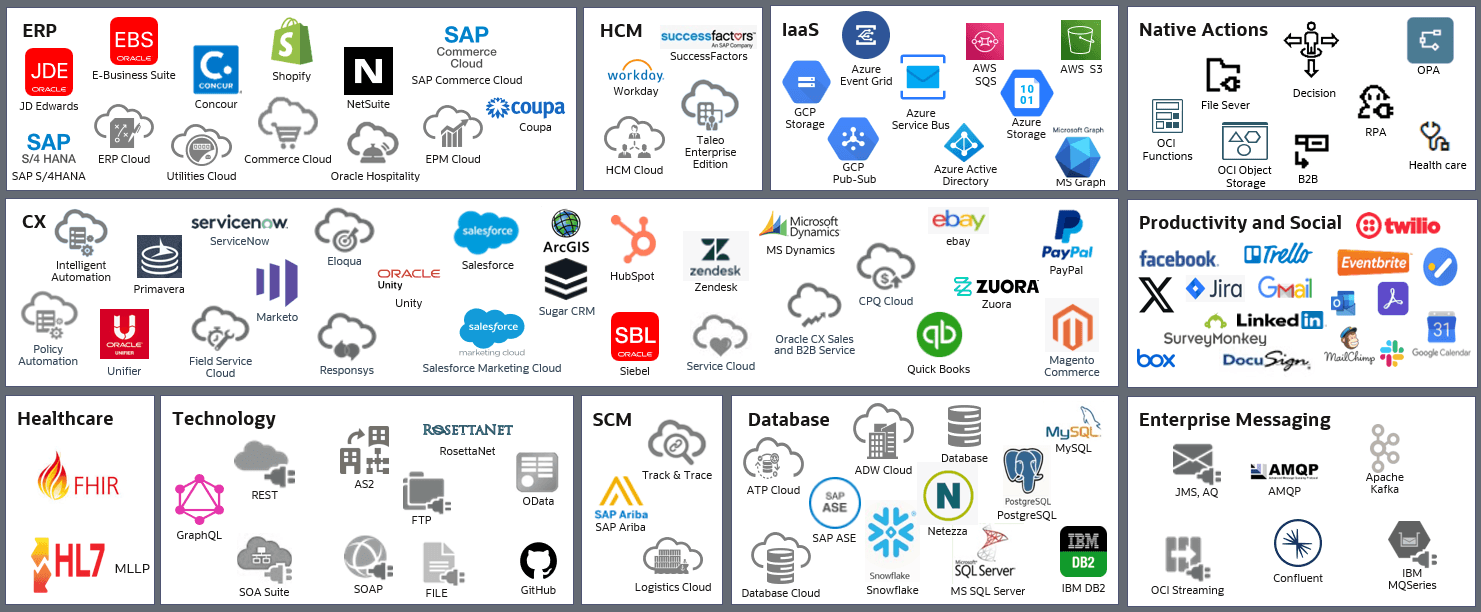
    Here's a glimpse of some of the more popular adapters.

    Graphical representation of the available adapters

  • Actions for OCI AI services

    Oracle Integration is part of a larger Oracle toolkit, including Oracle Cloud Infrastructure (OCI) AI services. You can connect directly to many OCI services without even needing an adapter. Just drop the action for one of the services into your integration to invoke the service. You can browse the actions on the Adapters page on the Oracle Help Center.

  • Technology adapters

    If an application-specific adapter isn't available or doesn't meet your requirements, you can still connect to just about any application using one of the technology adapters. Technology adapters include the REST Adapter, SOAP Adapter, FTP Adapter, and File Adapter.

  • Build your own adapter

    If an application-specific adapter isn't available or doesn't meet your requirements, use the Rapid Adapter Builder to build your own adapter. See Learn About the Rapid Adapter Builder in Oracle Integration in Using the Rapid Adapter Builder with Oracle Integration 3.

Note:

Adapters let an integration connect to applications that have REST APIs. When applications don't have APIs, build a robot instead of an integration. See Build Robots.

Specialized connectivity

When you need to connect to applications and resources that are on premises or in a virtual cloud network (VCN), configure the appropriate adapter to work with the following connectivity features:

  • Connectivity agent

    Connect to resources that are in an on-premises network or private cloud using the connectivity agent. See About Creating Hybrid Integrations in Using Integrations in Oracle Integration 3.

  • Private endpoint

    Connect to private resources that are in your VCN using a private endpoint. See Connect to Private Resources in Provisioning and Administering Oracle Integration 3.

Usage

An adapter lets you invoke an application's APIs in real time, allowing you to move data between systems in a number of ways. For example:

  • Pull data from a source application using a trigger connection.

  • Send data to a target application using an invoke connection.

  • Process multiple items at the same time using batch operations.

To see more real-world case studies, see Review Use Cases.

AI-powered capabilities

Many AI features are available for adapters. Here are a few to be aware of:

  • Save time by entering natural language and letting AI generate integrations, prepare queries, configure business objects, and configure endpoints.

  • Easily connect to AI applications, including Anthropic and OpenAI, using application-specific adapters.

To explore all AI features, see AI Innovation and Oracle Integration in Using Integrations in Oracle Integration 3.

Primary users

  • Integration developers connect to applications using adapters, actions for OCI AI services, connectivity agents, and private endpoints.

  • Administrators of the service instance configure the connectivity agent and a private endpoint.

See Users of Oracle Integration.

Related technologies

You work with adapters and connectivity features only when building integrations. See Integrate Applications.

Availability

Adapters and the connectivity features are available to everyone, regardless of your Oracle Integration edition, with the following exceptions:

  • Some adapters are available in select editions. See Oracle Integration Editions in Provisioning and Administering Oracle Integration 3.

  • The actions for connecting to OCI AI services are available in select regions. See AI Feature Availability in Provisioning and Administering Oracle Integration 3.


Explore Your Next Steps

Goal More information

Learn about and plan automation

Compare and Plan Automation

Review Use Cases

Watch a video about Rapid Adapter Builder