Use Case: Procure to Pay
In the procure-to-pay process, a product manufacturer orders parts from a parts supplier, which fulfills the order and receives payment.
Overview
For details about the order to cash use case, see Use Case: Order to Cash.
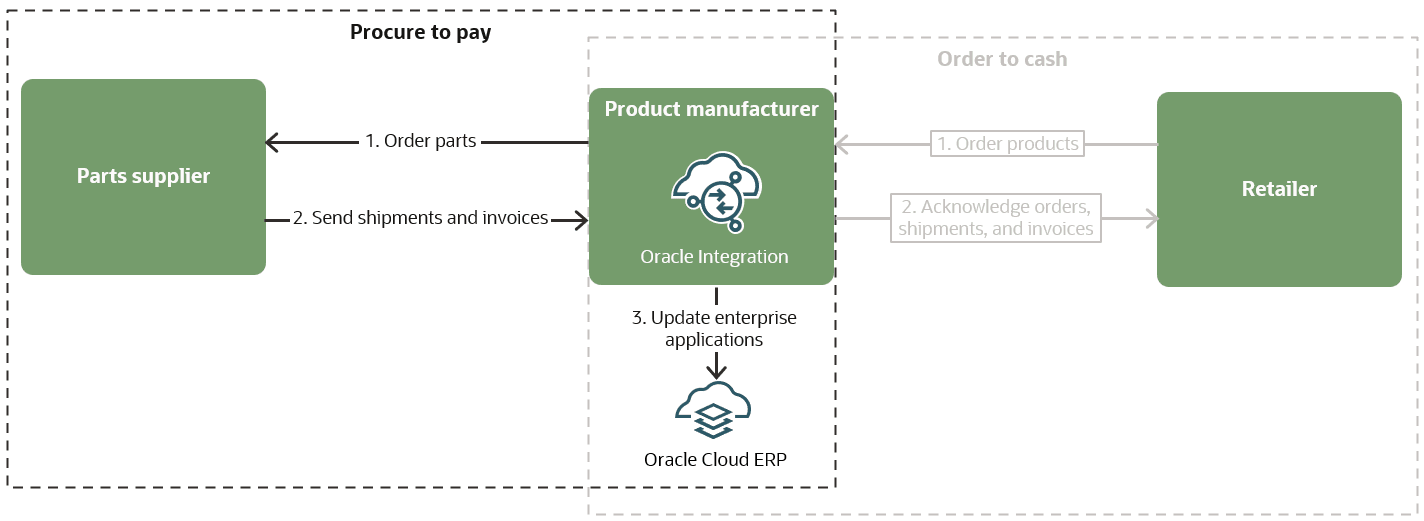
| Step 1. Place an order | Step 2. Receive updates | Step 3. Shipment and invoice | Step 4. Send payment |
|---|---|---|---|

 Post an order file to File Server for new parts Send messages according to the B2B configuration |
Send messages to the parts manufacturer according to the B2B configuration |
Send messages to the parts manufacturer about the shipment and invoice according to the B2B configuration |
Pay for the order |
Step 1. Place an order
Your company is a product manufacturer that needs to order parts from a parts supplier.
-
You upload an EDI file to File Server.
-
Integrations created by you and the retailer send the following messages over the AS4 protocol according to the B2B configuration:
Sender Message Reason Your company
850 Purchase OrderIdentify the items to order
Parts manufacturer
(After verifying the file and sender)
MDN(Message Disposition Notification)Confirm receipt of the file
Step 2. Receive updates while the order is processed
-
A receive integration, which was created based on the parts manufacturer's configuration, detects the uploaded file.
-
The receive integration performs the following tasks:
-
Identifies the parts manufacturer and the agreement to process the
850 Purchase Order. -
Parses the
850 Purchase Orderto perform validations. -
Sends the following message over the AS4 protocol according to the B2B configuration:
Sender Message Reason Parts manufacturer
997 Functional
                                                  Acknowledgment
Informs the parts manufacturer whether the validation was successful or experienced an error
-
-
The agreement runs a back-end integration, which was configured for the agreement. The integration performs the following tasks:
-
Translates the file using the B2B schema.
-
Converts the file into the XML format required by Oracle Cloud ERP and uses the Oracle ERP Cloud Adapter to write the purchase order for the incoming
850
                                        Purchase Order
. -
Receives the EDI order file and converts it the format that the ERP system requires.
-
-
An integration sends the following message over the AS4 protocol according to the B2B configuration:
Sender Message Reason Parts manufacturer
(If the file meets all requirements and your company can fulfill the order)
855 Purchase Order
                                                Acknowledgment
Accept the purchase order
Step 3. Shipment and invoice
-
The parts manufacturer ships the order to you.
-
An integrations send the following messages over the AS4 protocol according to the B2B configuration:
Sender Message Reason Your company
997 AcknowledgmentConfirm receipt of the
855Parts manufacturer
856 Advance Ship
                                            Notice
Provide the shipment contents and logistics
Your company
997 AcknowledgmentConfirm receipt of the
856Parts manufacturer
810 InvoiceSend an invoice for the order
Your company
997 AcknowledgmentConfirm receipt of the
810
Step 4. Send payment
You pay the retail company for the order.