Enable Child Loop Parsing
If the parent and child loops share the same first segment, you can enable parsing on the child loop so that, once inside the parent loop, the child loop’s segment is matched instead of the parent loop's segment.
- Edit a schema in a project.
- In the navigation pane, click Projects.
- Click the project in which you want to edit the schema.
- Click B2B
 .
. - In the Schemas section, hover over the schema and click Actions
 , then select Edit.
- Edit a schema in a standalone environment.
- In the navigation pane, click B2B, then Schemas.
- Hover over a schema and click Edit
 .
.
- In the example schema, note that the segment
HLis present as the first segment in both the parent loopLoop-2000Aand the child loopLoop-2000B.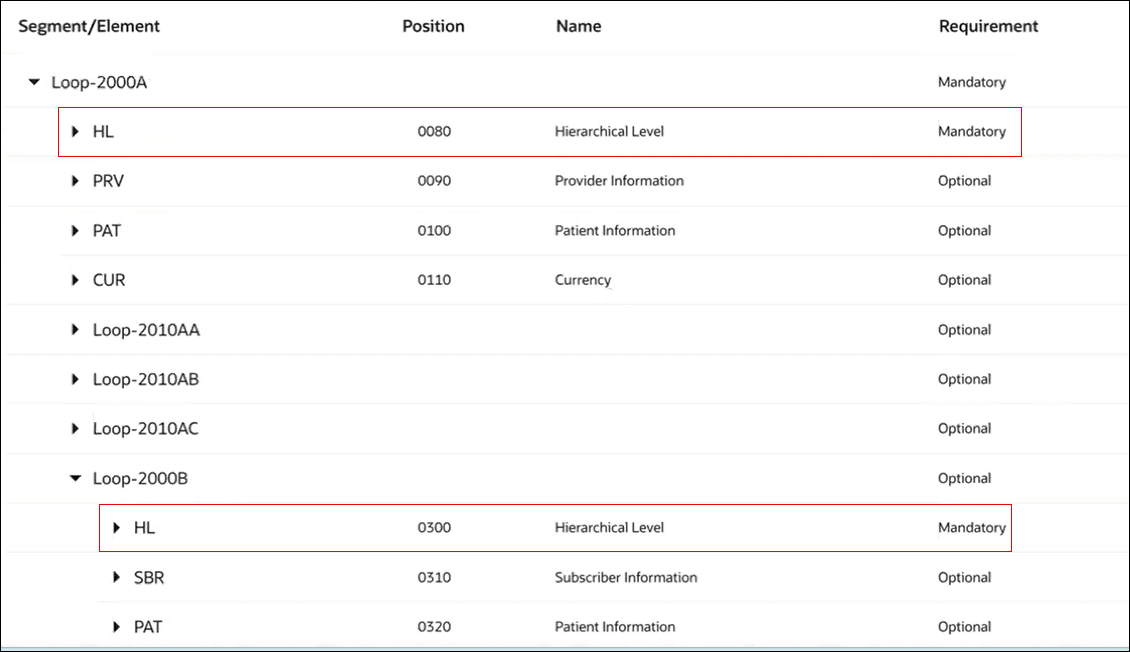
- To match the
HLsegment in the child loop before the parent loop, configure the child loop.- Hover over the child loop and click Edit .
- To further customize and define conditions when parsing will be enforced in the child loop before the parent loop, enter the following details.
- In the Element drop-down list, select an element that is part of the segment. For example,
HL03. - In the Values field, enter the value. For example,
23. You can also give comma separated values such as23,34.
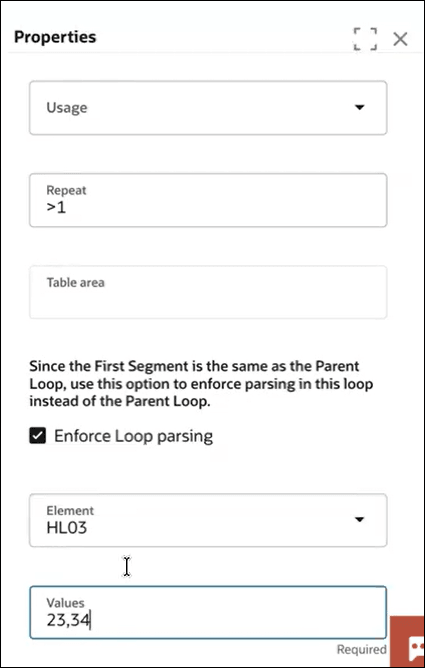
This ensures that only when the child loop's
HLsegment has theHL03element with values either23or34, it will be matched before theHLsegment in the parent loop. - In the Element drop-down list, select an element that is part of the segment. For example,
- Hover over the child loop and click Edit