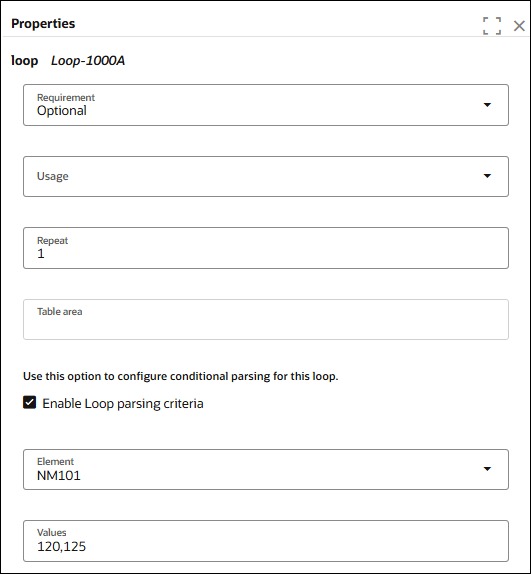
Enable Conditional Loop Parsing for an X12 HIPAA Schema (837 or 238)
You can set conditional parsing in loops of an X12 HIPAA schema of document type 837 or 238.
- Edit an X12 HIPAA schema in a project.
- In the navigation pane, click Projects.
- Click the project in which you want to edit the schema.
- Click B2B
 .
. - In the Schemas section, hover over the schema and click Actions
 , then select Edit.
- Edit an X12 HIPAA schema in a standalone environment.
- In the navigation pane, click B2B, then Schemas.
- Hover over a schema and click Edit
 .
.
- Select a loop and click Edit details .
- In the Values field, enter a value. You can also enter comma separated values, for example:
120,125. This ensures that the parser will match this loop segment only when the values of the specified element is either 120 or 125.